An iPhone emulator for Windows provides the capability to simulate iOS environments directly on your PC, enabling app testing, development, and exploration of iOS features.
This comprehensive guide explores the top 10 iOS emulators for Windows in 2026, covering both free and paid options to help you find the perfect solution for your needs.
Want the full picture? Read our continuously-updated iOS Simulators Complete Guide (2026) — Xcode simulator, online iPhone simulators, and dev workflows.
What is an iPhone Emulator and Why Do You Need One?
An iPhone emulator for PC is specialized software that replicates iOS functionality on Windows computers, allowing users to run iPhone apps, test applications, and experience the iOS interface without owning an Apple device.
Unlike iOS simulators that only mimic the interface, emulators attempt to replicate both hardware and software behaviors, though true hardware emulation remains limited due to Apple's proprietary architecture.
Understanding iPhone Emulators vs iOS Simulators
The distinction between emulators and simulators is crucial for Windows users. An iOS emulator for Windows attempts to replicate both the hardware and software environment of iOS devices, while simulators only mimic the software behavior and interface.
Apple's official iOS Simulator runs exclusively on macOS through Xcode iOS emulator, making it inaccessible to Windows users without workarounds.
Most tools marketed as iPhone emulators for Windows are actually hybrid solutions that simulate iOS interfaces while providing limited functional capabilities. True hardware emulation of iOS on Windows remains technically impossible due to Apple's custom chipsets and legal restrictions surrounding iOS distribution.
Quick View: Best iPhone Emulator for Windows PC 2026
Technical Capabilities and Features
| Emulator | Installation Required | Real Device Access | App Store Support | Development Capability | Debugging Tools | iOS Version Support |
|---|---|---|---|---|---|---|
| Smartface | Yes | No | No | Full native development | Advanced | iOS 10.3 - 18.1 |
| Appetize.io | No (Browser) | No | Upload .ipa files | Limited testing only | Basic | Multiple versions |
| iPadian | Yes | No | No | None (UI only) | None | iOS 17 interface |
| Remoted iOS Simulator | Yes | No (Remote Mac) | Through Mac | .NET MAUI only | Visual Studio integration | All (via Mac) |
| Electric Mobile Studio | Yes | No | No | Full development | Advanced | Multiple versions |
| Corellium | No (Cloud) | Yes (Virtual) | No | Testing & research | Enterprise-grade | All major versions |
| AIR iPhone | Yes | No | No | None | None | iOS 3 interface |
| BrowserStack | No (Browser) | Yes (Real devices) | Upload apps | Testing only | Professional | Latest devices |
| Ripple | No (Extension) | No | No | HTML5 only | Browser DevTools | N/A (HTML5) |
| MacStadium/MacinCloud | No (Remote) | Yes (Real Simulator) | Full Xcode access | Complete iOS development | Full Xcode suite | All versions |
Use Cases and Target Audience
| Emulator | Minimum RAM | Minimum Storage | Internet Required | Windows Version | Mac Hardware Needed | Performance Rating |
|---|---|---|---|---|---|---|
| Smartface | 4GB | 2GB | Yes (for cloud) | Windows 7+ | No | ⭐⭐⭐⭐ |
| Appetize.io | 2GB | None (browser) | Yes (always) | Any | No | ⭐⭐⭐⭐⭐ |
| iPadian | 2GB | 200MB | No | Windows 7+ | No | ⭐⭐⭐ |
| Remoted iOS Simulator | 4GB | 1GB | Yes (Mac connection) | Windows 10+ | Yes (remote) | ⭐⭐⭐⭐ |
| Electric Mobile Studio | 8GB | 5GB | No | Windows 10+ | No | ⭐⭐⭐⭐ |
| Corellium | 2GB | None (cloud) | Yes (always) | Any | No | ⭐⭐⭐⭐⭐ |
| AIR iPhone | 2GB | 100MB | No | Windows 7+ | No | ⭐⭐ |
| BrowserStack | 4GB | None (browser) | Yes (always) | Any | No | ⭐⭐⭐⭐⭐ |
| Ripple | 2GB | 50MB (extension) | No | Any (Chrome) | No | ⭐⭐⭐ |
| MacStadium/MacinCloud | 4GB | None (cloud) | Yes (always) | Any | Yes (cloud) | ⭐⭐⭐⭐⭐ |
1. Smartface – Revolutionary iOS Emulator for Windows
Platform: Windows, macOS, Linux
Pricing: Free trial available, Paid plans starting from $99/month
Rating: ⭐⭐⭐⭐⭐ 4.6/5
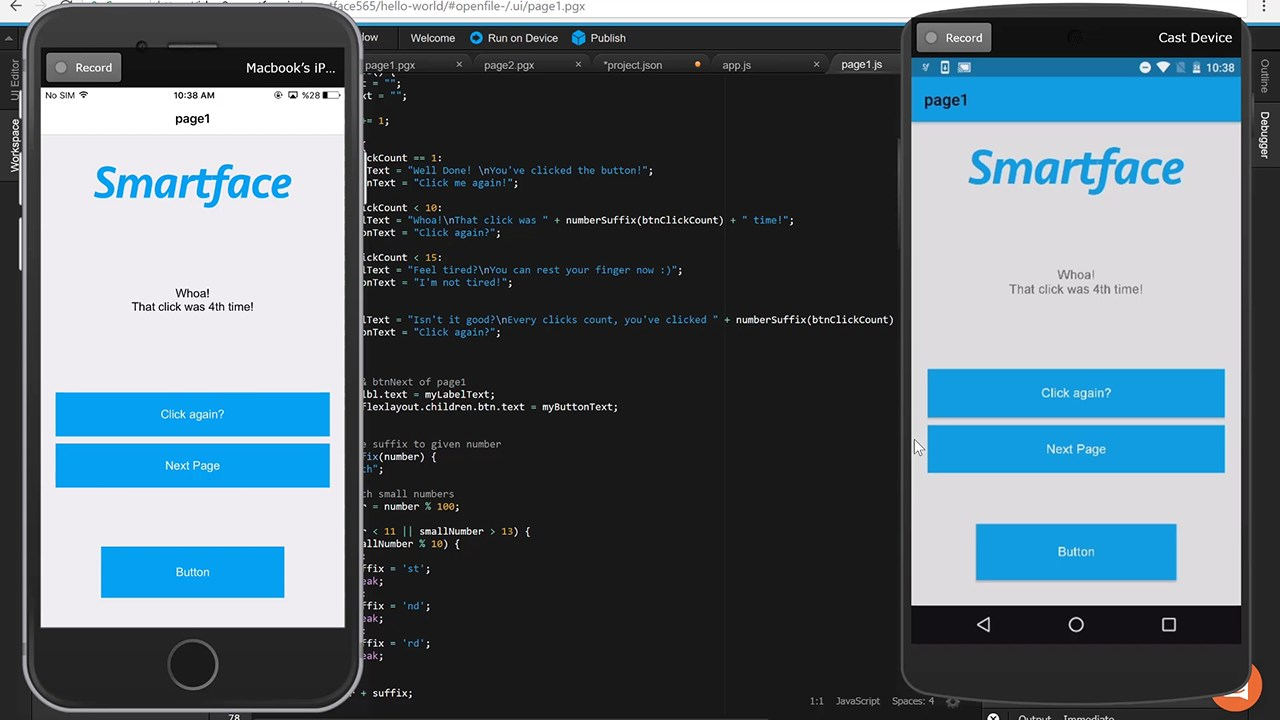
Smartface stands as the industry's only true iOS emulator for Windows solution, eliminating Mac hardware requirements entirely and Android emulator. This professional-grade platform enables native iOS app development directly on Windows PCs using JavaScript and TypeScript, supporting device coverage from iPhone 6 through iPhone 16 Pro Max.
Key Features of Smartface iOS emulator
- Windows-native iOS development without Mac dependency
- Comprehensive cross-platform testing across iOS, Android, and web browsers
- Real-time debugging with integrated development tools
- Support for iOS 10.3 through iOS 18.1 including beta releases
- Browser-based emulator for instant access
Performance Characteristics of Smartface iOS emulator
- Average app launch time: 3-5 seconds
- Hot reload capability: <500ms
- Supports simultaneous testing on 5+ virtual iOS devices
- Hardware acceleration: GPU-optimized for Windows
Best Suited For:
- Professional development teams building iOS + Android simultaneously
- Enterprise mobility initiatives
- Startups eliminating Mac hardware investment
- Cross-platform framework developers (React Native, Flutter alternatives)
- Developers already invested in Windows/Linux ecosystems
Pros of Smartface iOS emulator
✅ Eliminates $1,500-$2,500 Mac hardware costs
✅ Native application performance (not interpreted)
✅ Extensive iOS version coverage (iOS 10.3-18.1)
✅ Seamless cross-platform development workflow
✅ Professional debugging and profiling capabilities
✅ Regular feature updates (monthly release cycle)
✅ Free trial provides full feature access
Cons of of Smartface iOS emulator
❌ Subscription requirement ($99+/month)
❌ Initial learning curve for developers new to IDE
❌ Requires stable internet for cloud compilation services
❌ Limited UI framework flexibility compared to Xcode
❌ Browser-based version requires demo access request
❌ Community size smaller than Xcode ecosystem
Pricing Structure of Smartface iOS emulator
| Plan | Monthly Cost | Devices | Users | Best For |
|---|---|---|---|---|
| Starter | $99 | 5 | 1 | Solo developers |
| Professional | $199 | 15 | 3 | Small teams |
| Enterprise | Custom | Unlimited | Unlimited | Organizations |
Setup & Integration:
- Download Smartface IDE from smartface.io
- Install on Windows PC
- Create project (iOS + Android simultaneously)
- Configure project settings (app name, bundle ID, permissions)
- Deploy to cloud iOS simulator or connected physical device
- Real-time debugging via integrated terminal
CI/CD Integration:
Smartface provides CLI tools for:
- Automated builds in GitHub Actions
- GitLab CI/CD pipeline integration
- Jenkins build automation
- Appcircle for automated app distribution
Real-World Performance:
Enterprise QA teams using Smartface report 60% reduction in iOS testing time compared to Mac-based Xcode workflows due to hot-reload capabilities and parallel multi-device testing.
Verdict: Smartface is the gold-standard solution for professional iOS development on Windows. The $99/month cost is negligible when compared to Mac hardware investment, and the native development capabilities exceed most third-party solutions.
2. Appetize.io – Cloud-Based Windows iPhone Simulator
Rating: ⭐⭐⭐⭐⭐ 4.8/5 Platform: Web-based (browser)
Pricing: Free tier (100 minutes), $59/month Starter, $319/month Premium
Appetize.io revolutionizes iOS emulator for Windows accessibility by delivering entirely browser-based iOS simulation without any downloads or installations. This cloud-powered platform serves developers, QA teams, and product managers with instant iOS app access across any Windows device.
Key Features:
- Zero installation required—runs entirely in web browsers
- Upload and test .ipa files directly through web interface
- API integration for automated testing workflows
- Multiple device and iOS version support simultaneously
- Network condition simulation for comprehensive testing
Best For: Quick demos, prototype testing, remote teams, and developers needing instant iOS access without local setup.
Pros of Appetize.io iOS Emulator
- No software installation or configuration needed
- Free tier available with 100 streaming minutes
- Excellent for demonstrations and client previews
- Cross-platform accessibility from any browser
Cons of Appetize.io iOS Emulator
- Minute-based pricing can become expensive with heavy usage
- Requires stable internet connectivity
- Limited offline functionality
- Free tier restrictions may not suit extensive testing
Performance Specifications of Appetize.io iOS Emulator
- App launch time: 5-8 seconds
- Stream latency: 80-150ms (browser to cloud)
- Concurrent sessions: Depends on plan (1-10)
- Storage: 2GB per build
- Video quality: Up to 1080p 30fps
Pricing Breakdown
| Tier | Cost | Monthly Minutes | Concurrent Sessions | Best For |
|---|---|---|---|---|
| Free | $0 | 100 | 1 | Casual testing |
| Starter | $59 | 500 | 2 | Small teams |
| Professional | $159 | 2000 | 5 | Growing teams |
| Premium | $319 | Unlimited | 10 | Enterprises |
Best Suited For:
- Quick demos and client presentations
- Remote team collaboration on mobile testing
- Prototype validation before development
- QA teams requiring instant device access
- CI/CD integration for automated testing
- Cross-platform testing (native apps, React Native, Flutter)
Pros of Appetize.io iOS Emulator
✅ Absolute zero installation or configuration
✅ Instant access from any browser (Windows/Mac/Linux)
✅ Free tier emulator provides legitimate testing capability (100 minutes/month)
✅ Excellent for remote team demonstrations
✅ Robust API for test automation
✅ Session recording for QA documentation
✅ Regular iOS version updates (within 2 weeks of Apple release)
✅ Supports both .ipa and .apk files
Cons of Appetize.io iOS Emulator
❌ Minute-based pricing model escalates with usage
❌ Requires continuous internet connectivity (streaming-based)
❌ Latency can impact touch-sensitive testing
❌ Limited to simulator capabilities (no jailbreak/root access)
❌ Video streaming quality dependent on bandwidth
❌ Not suitable for offline development workflows
CI/CD Integration Examples:
# GitHub Actions integration
- uses: appetize/upload@v1
  with:
    app: ${{ secrets.APP_IPA_URL }}
    platform: ios

# Results in shareable app link
# https://appetize.io/app/{app_id}
Real-World Implementation:
A fintech startup uses Appetize.io for daily QA testing of their payment app across 15 iOS device configurations. Monthly cost: $159 (Professional plan). Annual savings vs. maintaining physical device lab: $45,000+.
Verdict: Appetize.io is the optimal solution for teams prioritizing instant accessibility and collaboration over feature depth. The free tier legitimately supports small project testing, while paid plans scale efficiently for growing QA operations.
3. iPadian – User-Friendly iOS Windows Emulator
Platform: Windows, macOS, Linux
Pricing: Free version available, Premium $25 one-time purchase
Rating: ⭐⭐⭐⭐ 4.0/5
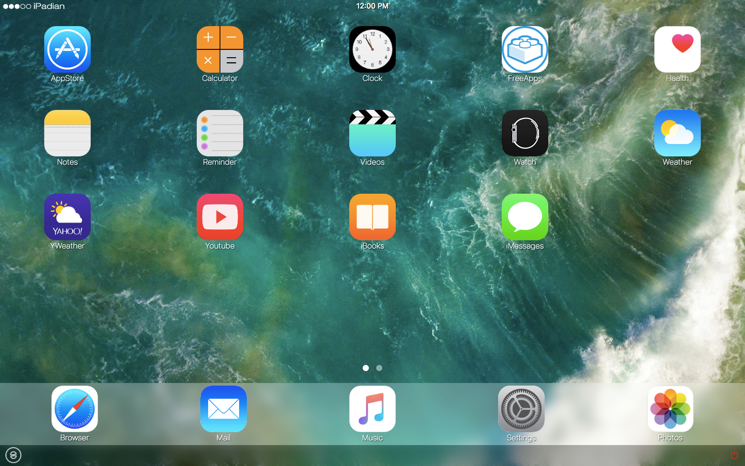
iPadian provides Windows users with an accessible iPhone emulator for PC experience, focusing on iOS interface replication rather than deep functional emulation. The Premium version, costing just $25 as a one-time payment, unlocks ad-free usage and additional features including AI-powered applications.
Key Features of iPadian iPhone emulator
- iOS 17 interface visual replication
- Pre-installed popular apps (WhatsApp, Instagram, Facebook, YouTube simulator)
- Integrated AI applications (ChatGPT, image generators)
- Customizable homescreen with app shortcuts
- Swipe gestures and basic touch simulation
- Multiple device frame options (iPhone 15, iPad appearance)
- Built-in App Store sidebar with curated app selection
- Voice command simulation
- Dark mode and light mode options
Best Suited For:
- Students learning iOS interface design principles
- Casual users evaluating iOS before purchasing Apple devices
- Content creators demonstrating iOS features in videos
- Educators teaching mobile app concepts
- Individuals with older Windows hardware (resource-constrained systems)
- Non-technical users exploring iOS aesthetics
Pros of iPadian iPhone emulator
✅ Extremely affordable ($25 one-time payment, no subscription)
✅ Zero technical expertise required
✅ Simple installation wizard (30 seconds)
✅ Intuitive user interface for beginners
✅ Free version available for basic exploration
✅ Low system resource requirements (runs on 10-year-old PCs)
✅ Fast application launch (sub-second startup)
✅ No internet requirement for basic functionality
Cons of iPadian iPhone emulator
❌ Cannot run actual iOS App Store applications
❌ Interface simulator, not functional emulator
❌ Limited app selection (50-100 curated apps maximum)
❌ No real iOS code execution
❌ Not suitable for app development or QA testing
❌ Free version includes advertisements
❌ Outdated iOS interface appearance (iOS 17, not latest)
❌ No networking or hardware feature simulation
Verdict: iPadian is valuable for educational purposes and casual exploration but unsuitable for professional development or QA testing. The $25 one-time cost provides excellent value for students and non-developers.
4. Remoted iOS Simulator for Windows
Platform: Windows (requires Mac connection)
Pricing: Free (included with Visual Studio 2022)
Rating: ⭐⭐⭐⭐ 4.2/5
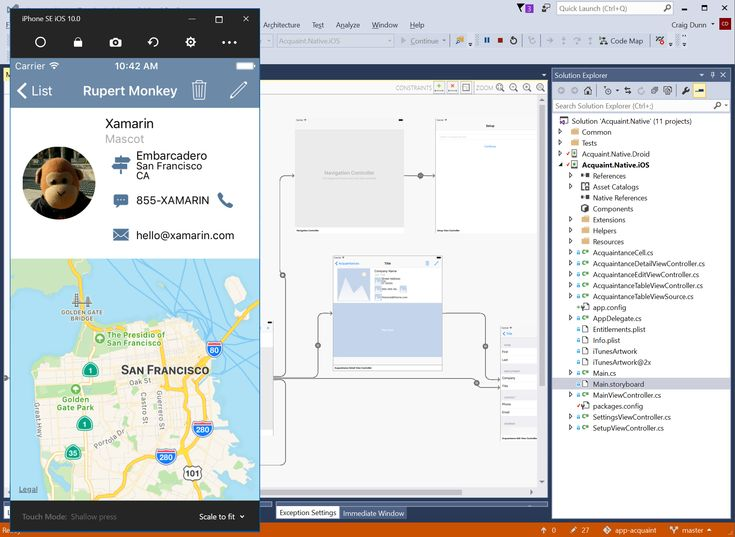
Microsoft's Remoted iOS Simulator enables Windows developers to test iOS applications locally while leveraging a paired Mac's processing power. This iOS simulator for Windows solution integrates seamlessly with Visual Studio 2022, automatically installing as part of the .NET MAUI development workload.
Key Features of Remoted iOS Simulator
- iOS simulator display rendered directly in Windows interface
- Automatic installation with Visual Studio 2022 .NET MAUI workload
- Remote Mac connection for actual iOS simulation
- Touch gestures and stylus input support
- Integration with Visual Studio debugging tools
Best Suited For:
- .NET MAUI developers on Windows-centric teams
- Xamarin.iOS developers
- Microsoft ecosystem developers (Azure, Office 365 integrations)
- Cross-platform teams (C# shared code, iOS/Android/Windows)
- Developers already invested in Visual Studio
- CI/CD pipelines using Microsoft DevOps (Azure DevOps)
Pros of Remoted iOS Simulator
✅ Completely free (included with Visual Studio subscription)
✅ Seamless Visual Studio integration (no context switching)
✅ Official Microsoft support and documentation
✅ Familiar Windows development environment
✅ Works with familiar Visual Studio debugger
✅ Supports latest iOS versions automatically
✅ Integration with Azure DevOps CI/CD
✅ No additional software licensing required
Cons of Remoted iOS Simulator
❌ Requires Mac hardware (defeats purpose for Windows-only teams)
❌ Cannot function without Mac connection (not suitable for offline development)
❌ Network-dependent performance (latency impacts debugging)
❌ Limited to .NET MAUI and Xamarin developers
❌ Restricted to Visual Studio 2022 (not VS Code)
❌ Mac setup and provisioning overhead
❌ Not suitable for native iOS development (Swift/Objective-C)
Performance Characteristics:
- App launch time: 8-15 seconds (includes network transfer)
- Debugging breakpoint response: 200-500ms
- Hot reload capability: 2-5 seconds
- Network overhead: 50-100ms per interaction
Verdict: Remoted iOS Simulator is an excellent no-cost option for teams already owning Mac hardware and committed to Visual Studio. Its value proposition diminishes significantly if Mac purchase is required.
5. Electric Mobile Studio – Windows iPhone Emulator
Platform: Windows
Pricing: 7-day free trial, paid version (contact sales for pricing)
Rating: ⭐⭐⭐⭐ 4.0/5
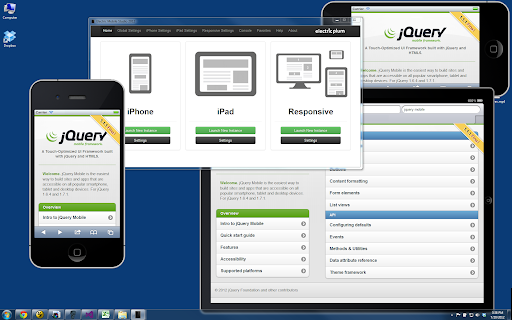
Electric Mobile Studio delivers enterprise-grade iOS emulator for Windows capabilities designed specifically for professional developers requiring precision and advanced debugging tools. This comprehensive platform supports full-fledged iOS app development, testing, and optimization workflows.
Architecture:
Electric Mobile Studio provides Windows-native iOS emulation with tight Visual Studio integration. The platform emphasizes professional development workflows, debugging precision, and team collaboration features.
Key Features:
- Complete iPhone and iPad emulation environment
- Advanced debugging and optimization tools
- Responsive design testing capabilities across device sizes
- JavaScript API support (location, localStorage, IndexedDB, geolocation)
- Accurate browser simulation with portrait/landscape orientation
- Multi-touch gesture simulation
- Performance profiling and optimization tools
- Visual Studio 2015-2022 integration (seamless plugin)
- Device configuration customization
- Screenshot and video capture
- Network simulation and throttling
Supported Frameworks:
- PhoneGap/Cordova applications
- React Native (JavaScript)
- Native HTML5 web apps
- Progressive Web Apps (PWAs)
- Hybrid mobile applications
- Native Objective-C (limited support)
Best Suited For:
- Professional iOS developers on Windows
- Enterprise development teams
- QA professionals requiring advanced testing tools
- PhoneGap and Cordova developers
- Visual Studio-centric development teams
- Organizations with standardized Windows development stacks
Pros of Electric Mobile Studio
✅ Seven-day full product trial (no credit card required)
✅ Comprehensive feature set for professional use
✅ Support for multiple device types and configurations
✅ Tight Visual Studio integration (2015-2022 compatible)
✅ Advanced debugging capabilities (breakpoints, watches, variables)
✅ Responsive design testing across device sizes
✅ Performance optimization tools
✅ Multi-user collaboration features
Cons of Electric Mobile Studio
❌ Paid version pricing not publicly disclosed (contact sales only)
❌ Steeper learning curve than consumer-oriented tools
❌ Requires technical expertise to maximize features
❌ May be excessive functionality for simple testing needs
❌ Limited community compared to open-source solutions
❌ Windows-only platform (no macOS or Linux support)
Verdict: Electric Mobile Studio is a solid professional option for Windows developers invested in Visual Studio, though pricing opacity and smaller community compared to Smartface and BrowserStack are notable drawbacks.
6. Corellium – Advanced iOS Emulator for Windows
Platform: Cloud-based (web)
Pricing: $99/month (2-core CPU), $295/month (6-core CPU), Enterprise plans available
Rating: ⭐⭐⭐⭐⭐ 4.5/5
Corellium represents the cutting-edge of iOS emulator for PC technology, providing fully virtualized iOS environments originally designed for security researchers and now available to individual developers. Unlike traditional emulators, Corellium runs genuine virtualized iOS systems with unparalleled accuracy and functionality.
Unique Technology of Corellium iOS emulator
Corellium uses proprietary ARM virtualization technology emulation (type-1 hypervisor) rather than emulation. This architecture runs actual iOS kernel code on virtualized ARM processors, rather than translating ARM instructions to x86—fundamentally different from traditional emulators.
Key Capabilities of Corellium iOS emulator
- True Arm type-1 hypervisor for authentic iOS virtualization
- Instant jailbreak and root access to iOS filesystem
- Full firmware kernel monitoring and control
- Real-time system call inspection
- Memory and CPU profiling tools
- Hardware-accelerated H.264/H.265 video compression
- Support for iOS, Android, and Linux on unified platform
- Network traffic interception and analysis
- Custom CoreLocation (GPS) emulation
- Sensor data injection (accelerometer, gyroscope)
- File system manipulation and app data inspection
- Snapshot and restore capabilities
Deployment Options:
- Cloud SaaS: Corellium.com (web-based access)
- On-Premise: Self-hosted infrastructure option
- Hybrid: Combination of cloud + local resources
Pricing Structure of Corellium iOS emulator
| Tier | CPU Cores | Monthly Cost | Best For |
|---|---|---|---|
| Solo | 2 | $99 | Individual researchers |
| Viper | 6 | $295 | Professional penetration testers |
| Falcon | Enterprise | Custom | Security organizations |
| Academic | Educational | Free | University research |
Free Academic Program:
- Full access for university students and faculty
- Unlimited device hours
- Priority support
- No time restrictions
Best Suited For:
- Security researchers and penetration testers
- Mobile security auditing professionals
- Bug bounty hunters (iOS vulnerabilities)
- Cyber security experts
- Advanced developers requiring system-level access
- Organizations conducting security assessments
- Academic researchers studying mobile security
Pros of Corellium iOS emulator
✅ Unmatched precision—runs actual iOS kernel code
✅ Complete system-level access and introspection tools
✅ Jailbreak/root access for security research
✅ Network traffic monitoring and manipulation
✅ File system full access
✅ Professional-grade capabilities unavailable elsewhere
✅ Cloud SaaS or on-premises deployment options
✅ Free academic tier for universities
✅ Firmware kernel monitoring
Cons of Corellium iOS emulator
❌ Premium pricing structure ($99+/month)
❌ Geared toward advanced users—steep learning curve
❌ Requires technical expertise to utilize fully
❌ Overkill for basic app testing needs
❌ Not necessary for standard app development workflows
❌ Resource-intensive (requires powerful hardware)
Security Use Cases:
- Vulnerability Research: Identify iOS security flaws before public disclosure
- Malware Analysis: Inspect malicious iOS apps in isolated environment
- Penetration Testing: Assess enterprise iOS app security posture
- API Security: Intercept and analyze network traffic from apps
- Data Protection: Verify app encryption and data storage practices
Verdict: Corellium is specialized tooling for security professionals, not suited for general app development. Its premium pricing and advanced features justify expense only for organizations requiring deep system-level iOS access.
7. AIR iPhone – Lightweight Windows iOS Emulator
Platform: Windows
Pricing: Free
User Rating: 3.5/5
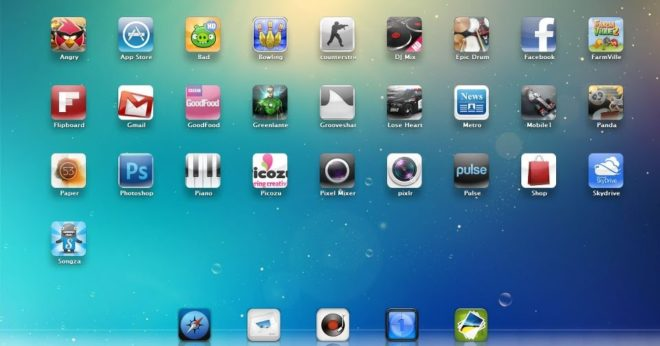
AIR iPhone creates a virtual iPhone interface on Windows PCs using the Adobe AIR framework, providing basic iPhone emulator for Windows functionality focused primarily on UI replication. This lightweight solution offers Windows users a simple way to familiarize themselves with iPhone interfaces without device ownership.
Key Features:
- iPhone GUI replication for visual interface exploration
- Adobe AIR framework integration
- Lightweight installation suitable for older systems
- Multi-touch functionality simulation
- Support for various iOS devices and versions
Best For: Users exploring iPhone interface before purchase, basic app preview, educational demonstrations, casual exploration of iOS aesthetics.
Pros of iPhone emulator for Windows
- Completely free to download and use
- Minimal system requirements
- Simple installation process
- Good for basic iOS interface familiarization
Cons of iPhone emulator for Windows
- Outdated interface resembling iOS 3
- Very limited functionality compared to modern emulators
- Cannot run actual iOS applications
- More visual emulator than functional tool
Installation Requirements:
AIR iPhone requires Adobe AIR framework pre-installed on your Windows PC. Once Adobe AIR is configured, download AIR iPhone from the official website and follow the straightforward installation wizard to complete setup.
8. BrowserStack: Free iOS Emulator for Windows

Platform: Web-based cloud platform
Pricing: $39/month individual, $25/user/month team plan, Enterprise custom pricing
User Rating: 4.7/5
BrowserStack App Live provides access to actual physical iOS devices hosted in the cloud, delivering authentic testing conditions impossible with software emulation. This comprehensive platform serves over 50,000 customers across 135+ countries, offering the industry's most reliable real device testing solution.
Critical Distinction: BrowserStack is NOT an emulator—it provides remote access to genuine iPhone and iPad hardware. This is fundamentally different from virtualized simulators and delivers superior testing fidelity.
Key Features of BrowserStack
- Access to 30,000+ real Android and iOS devices
- Real-time testing of native apps on actual iPhones and iPads
- Network condition simulation (2G, 3G, 4G, offline)
- Hardware feature validation (camera, GPS, Face ID, Touch ID)
- Integration with Jira, Slack, Trello, and major DevOps tools
Best For: QA teams, enterprise testing requirements, developers needing real device validation, production bug reproduction.
Pros of BrowserStack iOS Emulator
✅ Real devices guarantee 100% accurate testing
✅ Hardware features tested on actual hardware
✅ No device maintenance or provisioning overhead
✅ Instant access to latest iOS versions and devices
✅ Advanced debugging tools (logs, network monitoring, performance profiling)
✅ Comprehensive integration ecosystem (Jira, Slack, Jenkins, CircleCI)
✅ Geographic device distribution (test local behavior)
✅ 99.99% uptime SLA on enterprise plans
✅ Historical test data and trend analysis
Cons of BrowserStack iOS Emulator
❌ Higher cost than software-only emulators ($39-1000+/month)
❌ Requires continuous internet connection (streaming-based interaction)
❌ Device inventory limited (peak usage may cause wait times)
❌ Latency inherent to remote device access (80-200ms)
❌ Not suitable for offline testing or development
❌ Subscription cost recurring (no one-time purchase option)
Pricing Options of BrowserStack
| Plan | Price | Devices | Best For |
|---|---|---|---|
| Individual | $39/month | 30,000+ | Freelancers, solo developers |
| Team | $25/user/mo (5 min) | 30,000+ | QA teams (5+ people) |
| Enterprise | Custom | 30,000+ | Large organizations |
Best Suited For:
- Professional QA teams requiring production-like testing
- Enterprise applications demanding authentication testing
- Payment apps (Apple Pay, biometric validation)
- Apps with hardware-dependent features (camera, GPS, sensors)
- Production bug reproduction
- Pre-release testing on unreleased iOS versions
- Organizations with compliance requirements (financial, healthcare)
Integration Examples:
// Jira integration
POST /rest/api/3/issues
{
  "fields": {
    "project": { "key": "PROJ" },
    "summary": "iOS 18 Face ID fails on iPhone 16 Pro",
    "attachment": "browserstack-session-link",
    "environment": "iOS 18, iPhone 16 Pro, BrowserStack"
  }
}

// Slack notification
Channel: #qa-testing
BrowserStack Test Result: FAILED on iPhone 16 Pro (iOS 18)
Session: https://app.browserstack.com/sessions/{session_id}
Device: iPhone 16 Pro, iOS 18.1
Verdict: BrowserStack is essential for enterprises and QA-focused teams where testing accuracy justifies the cost. The real device advantage is irreplaceable for production-grade applications.
9. Ripple Emulator – Lightweight iOS Windows Emulator
Platform: Chrome Extension
Pricing: Free
User Rating: 3.8/5
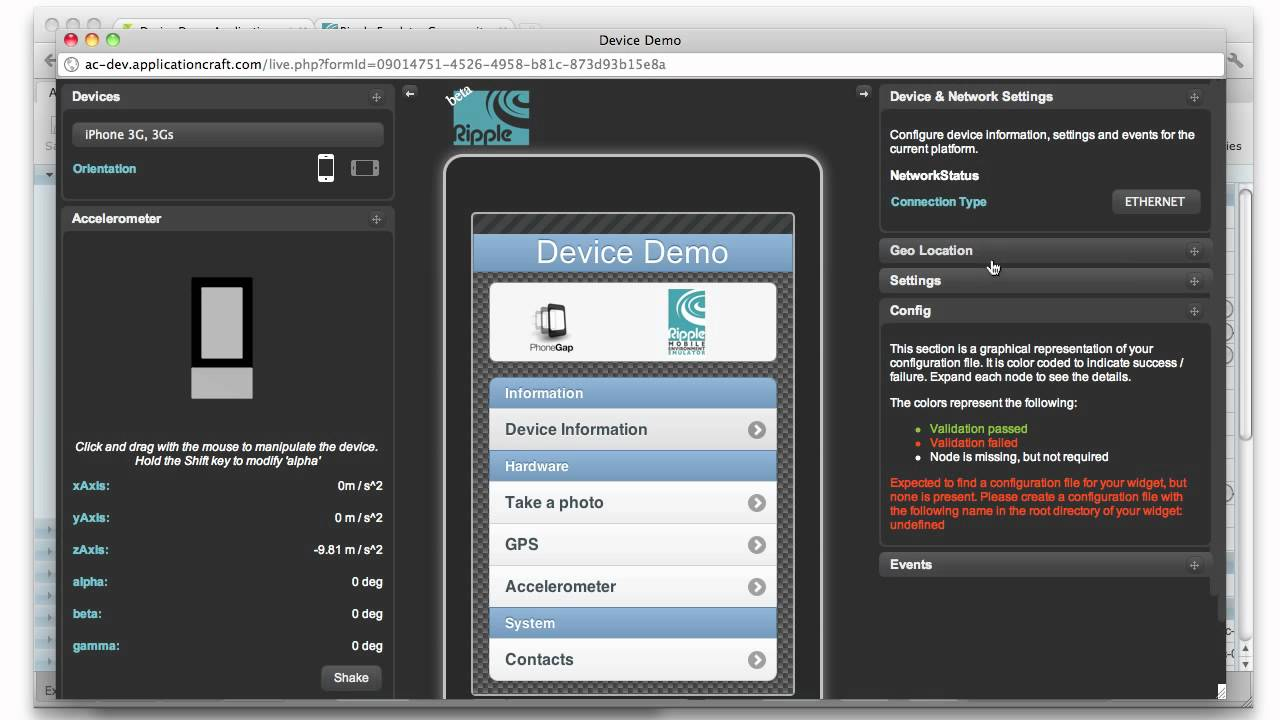
Ripple Emulator serves as a specialized iOS emulator for Windows focused exclusively on HTML5-based application testing, operating entirely within Chrome browsers without requiring software installations. Originally designed for PhoneGap and Apache Cordova developers, Ripple provides rapid multi-platform testing capabilities.
Key Features of Ripple Emulator iOS emulator for Windows
- Chrome extension installation—no separate software needed
- Multi-platform mobile emulation in browser environment
- Real-time automatic testing without emulator restarts
- HTML DOM inspection and JavaScript debugging
- PhoneGap APIs and BlackBerry WebWorks support
Best For: PhoneGap/Cordova developers, HTML5 app testing, web-based mobile application development, rapid prototyping.
Pros of Ripple iPhone Emulator for Windows
- Completely free and open-source
- No installation beyond Chrome extension
- Fast testing workflow without device setup
- Supports multiple device resolutions simultaneously
Cons of Ripple iPhone Emulator for Windows
- Limited to HTML5 applications only
- Cannot test native iOS functionality
- Requires Chrome browser exclusively
- Less comprehensive than full emulators
Setup Instructions:
Install Ripple Emulator from Chrome Web Store, enable the extension in Chrome, run your HTML code through local web server, click Ripple Emulator icon in Chrome toolbar, and select "Enable" to begin emulation. For PhoneGap projects, ensure cordova.js file is properly referenced in your project directory.
10. MacStadium / MacinCloud – iOS Emulator
Platform: Cloud-based Mac rental
Pricing: MacStadium from $249/month, MacinCloud from $30/month pay-as-you-go
Rating: ⭐⭐⭐⭐⭐ 4.6/5
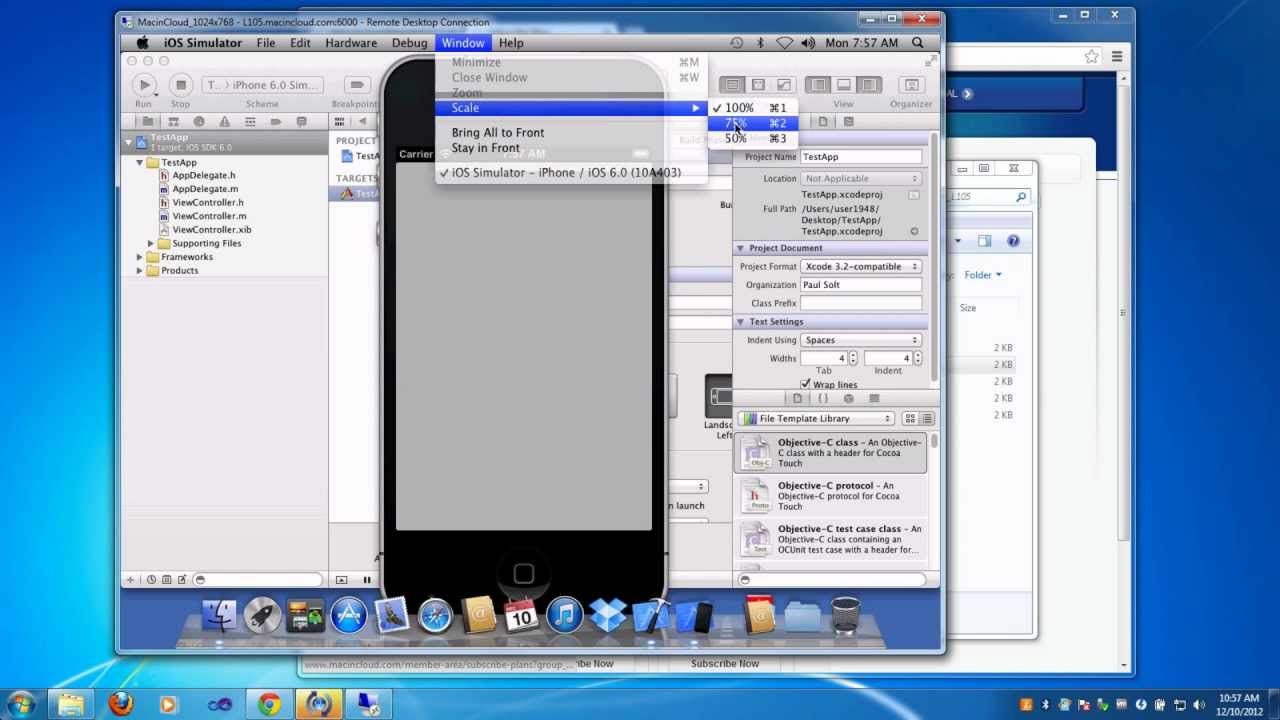
MacStadium and MacinCloud offer the most comprehensive iOS development on Windows solution by providing remote access to genuine Mac hardware, enabling Windows users to run official Xcode and iOS Simulator. These cloud Mac services represent the gold standard for authentic iOS development without Mac ownership.
Critical Advantage:
Users access 100% legitimate Apple tools (Xcode, iOS Simulator) running on real macOS hardware. This eliminates all workarounds and ensures complete Apple compliance and compatibility.
What You Get:
- Real macOS hardware in data centers
- Full Xcode installation (latest versions)
- Official Apple iOS Simulator (all iOS versions)
- Support for Swift, Objective-C, Flutter, React Native
- Direct App Store deployment capabilities
- 99.99% uptime guarantee
- Redundant infrastructure
Pricing Comparison:
| Service | Plan | Monthly Cost | Setup | Billing |
|---|---|---|---|---|
| MacStadium | Entry | $249 | 1 week | Monthly |
| MacStadium | Professional | $499 | 1 week | Monthly |
| MacinCloud | Hourly | $0.99/hour | Instant | Pay-as-you-go |
| MacinCloud | Monthly | $30-99 | Instant | Monthly |
MacinCloud Advantages:
- No long-term commitment (hourly billing)
- Instant activation (15 minutes)
- Lower entry cost ($30/month vs. $249)
- Flexible scaling (add/remove machines hourly)
- Pay only for hours used
Best Suited For:
- Serious iOS developers without Mac ownership
- App Store publishing workflows
- Professional development teams
- CI/CD pipeline integration (automated testing)
- Organizations requiring App Store compliance
- Developers needing genuine Xcode and iOS Simulator
- Teams requiring 24/7 access to development infrastructure
Pros:
✅ 100% legal and Apple-compliant solution
✅ Full access to genuine iOS Simulator (not third-party emulation)
✅ Complete development environment included (Xcode, SDKs, tools)
✅ Scalable for enterprise teams
✅ Highest testing fidelity (official Apple tools)
✅ 99.99% uptime SLA
✅ Redundant infrastructure and automatic failover
✅ Support for all development frameworks
✅ Direct App Store deployment
Cons:
❌ Recurring monthly subscription costs ($249-500+/month)
❌ Requires stable, high-speed internet connection
❌ Learning curve for remote Mac management and SSH access
❌ More expensive than software-only emulators
❌ Network latency inherent to remote access
❌ Not suitable for offline development
❌ MacStadium requires minimum 1-month commitment
Verdict: MacinCloud provides exceptional value ($30/month, 15-minute setup) for developers needing official Apple tools without Mac hardware investment. MacStadium suits organizations requiring 24/7 development infrastructure.
Pros and Cons Summary of iPhone Emulator for Windows PC
| Emulator | Top 3 Pros | Top 3 Cons |
|---|---|---|
| Smartface | - No Mac required - Full development capability - Cross-platform support | - Subscription cost - Learning curve - Limited hardware testing |
| Appetize.io | - Zero installation - Instant browser access - Great for demos | - Usage-based pricing - Requires internet - No offline mode |
| iPadian | - Extremely affordable ($25) - Very easy to use - Free version available | - No real app support - Outdated interface - Limited functionality |
| Remoted iOS Simulator | - Completely free - Visual Studio integration - Official Microsoft tool | - Requires Mac hardware - .NET only - Network dependent |
| Electric Mobile Studio | - Professional features - Advanced debugging - Windows native | - Undisclosed pricing - Steep learning curve - Limited availability |
| Corellium | - Real iOS virtualization - Jailbreak access - Enterprise-grade | - Expensive ($99-295/month) - Complex for beginners - Overkill for simple tasks |
| AIR iPhone | - Completely free - Very lightweight - Easy setup | - Extremely outdated (iOS 3) - No app support - Very limited use |
| BrowserStack | - Real iOS devices - Excellent device coverage - Professional tools | - Higher cost - Requires internet - No offline testing |
| Ripple | - Completely free - Browser-based - Fast testing | - HTML5 only - No native app support - Chrome only |
| MacStadium/MacinCloud | - Real Mac access - Full Xcode support - Legal & official | - Recurring costs - Requires internet - Learning curve |
Comparison of iPhone Emulator for Windows PC
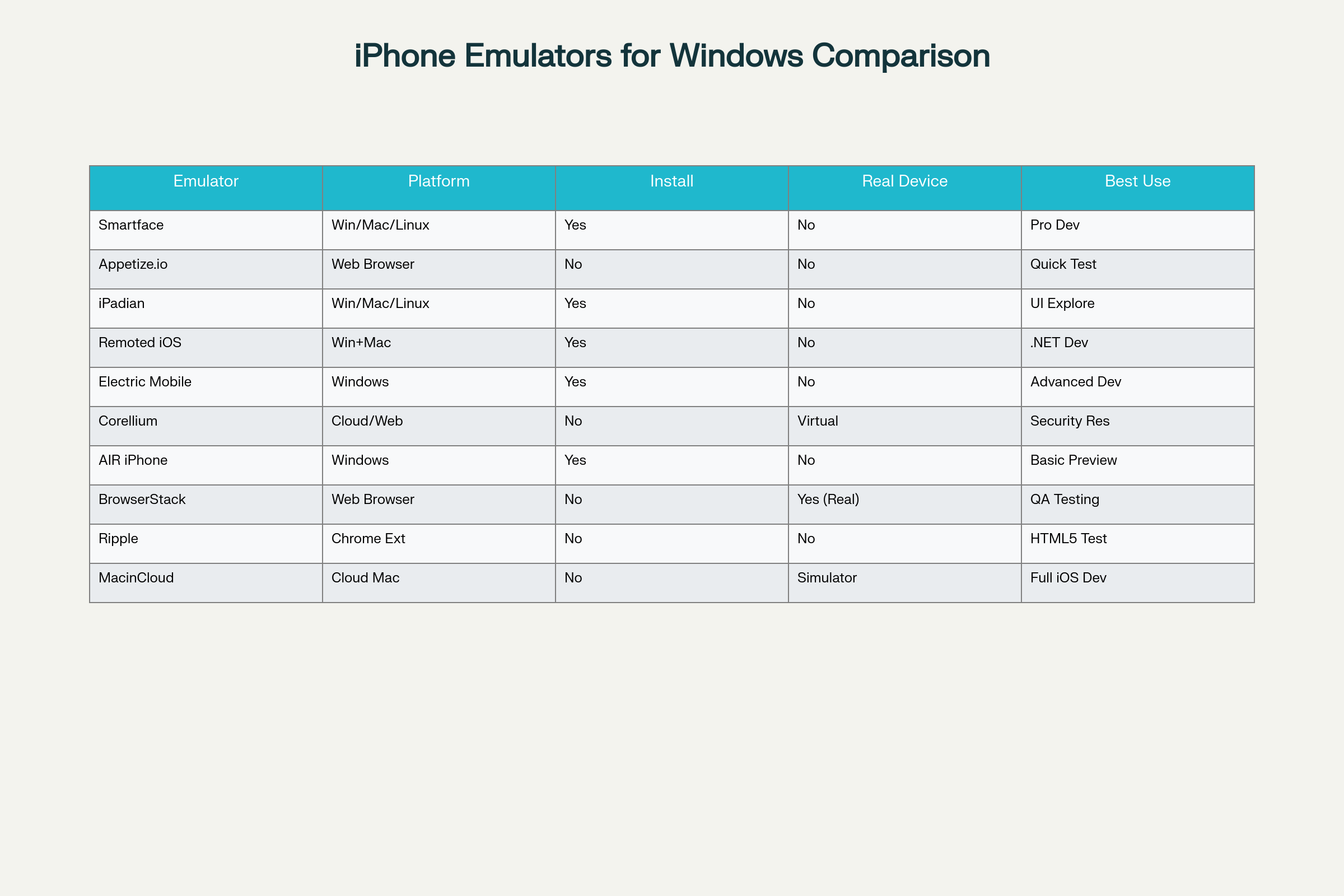
When selecting the best iPhone emulator for Windows, understanding specific capabilities becomes essential for informed decision-making. The comparison below highlights critical differentiators across the top 10 options:
Installation Requirements:
- No Installation: Appetize.io, BrowserStack, Ripple (Chrome only), MacinCloud/MacStadium
- Installation Required: Smartface, iPadian, Remoted iOS Simulator, Electric Mobile Studio, AIR iPhone, Corellium (cloud setup)
Real Device Access:
- Actual Real Devices: BrowserStack App Live
- Virtual Real iOS: Corellium
- Official iOS Simulator: MacStadium/MacinCloud (through Xcode)
- Software Emulation: All others
Development Capabilities:
- Full iOS Development: Smartface, MacStadium/MacinCloud, Electric Mobile Studio
- Limited Development: Remoted iOS Simulator (.NET only)
- Testing Only: Appetize.io, BrowserStack, Corellium
- Preview Only: iPadian, AIR iPhone, Ripple (HTML5 only)
Cross-Platform Support:
- Windows + Mac + Linux: Smartface, iPadian
- Windows Only: AIR iPhone, Remoted iOS Simulator, Electric Mobile Studio
- Web-Based (All Platforms): Appetize.io, BrowserStack, Corellium, MacStadium/MacinCloud
- Chrome Extension: Ripple
Pricing Analysis: Free vs Paid iPhone Emulators
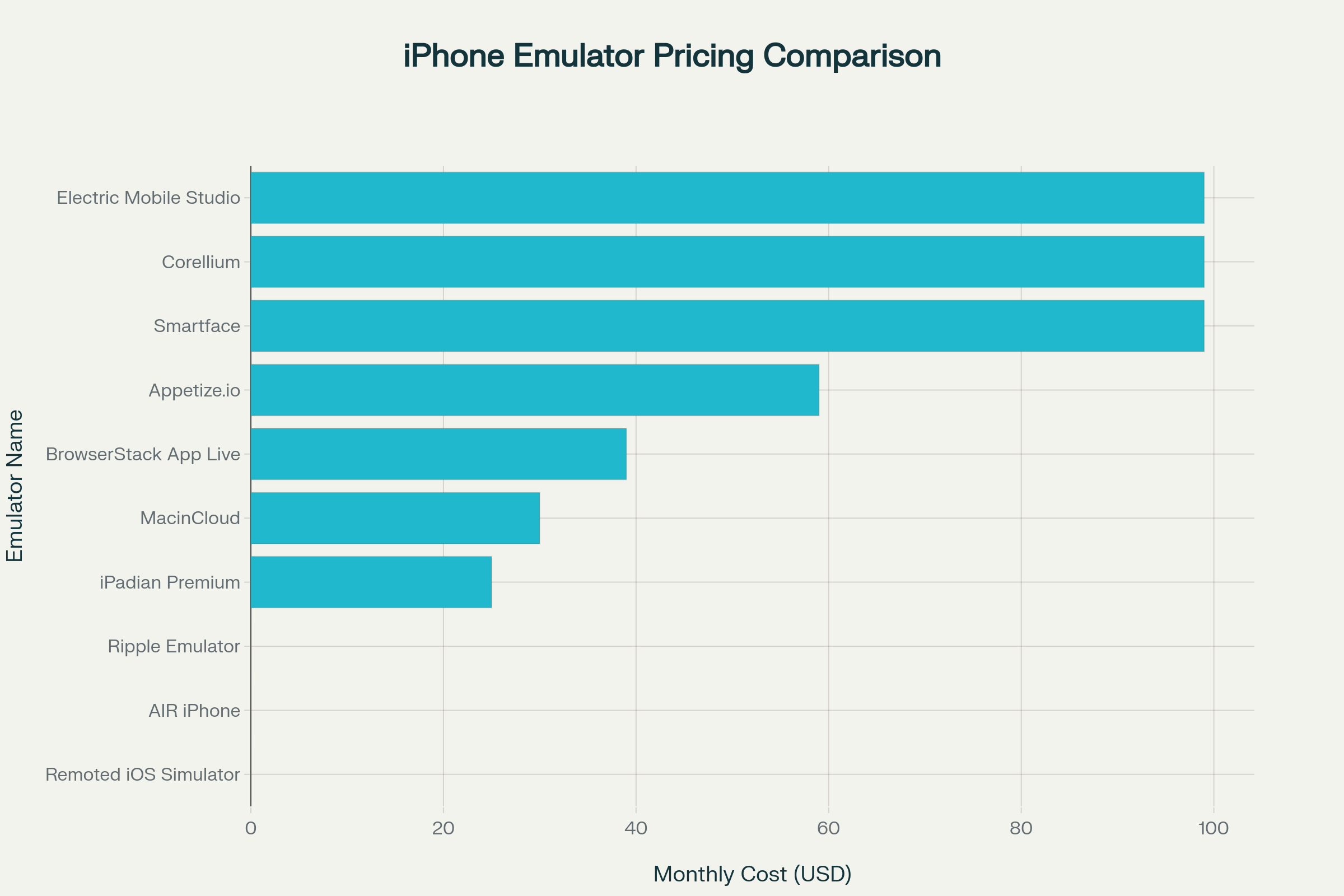
Understanding the cost structure of iOS emulators for Windows helps developers and businesses budget appropriately:
Free Options:
- Remoted iOS Simulator: Free with Visual Studio 2022, but requires Mac hardware
- AIR iPhone: Completely free but extremely limited functionality
- Ripple Emulator: Free Chrome extension for HTML5 apps only
- Appetize.io: 100 free minutes monthly, sufficient for light testing
- iPadian: Free version available with advertisements
Budget-Friendly Paid Options ($25-$50/month):
- iPadian Premium: $25 one-time purchase, excellent value for casual users
- MacinCloud: Starting $30/month, most affordable real Mac access
- BrowserStack: $39/month individual plan for real device testing
Professional Solutions ($99+/month):
- Smartface: $99/month for comprehensive Windows iOS development
- Corellium: $99-$295/month for security research and enterprise needs
- Electric Mobile Studio: Pricing undisclosed, professional-grade features
- MacStadium: $249+/month for dedicated Mac infrastructure
Enterprise Solutions:
- Appetize.io Premium: $319/month with unlimited device access
- BrowserStack Enterprise: Custom pricing with company-wide licenses
- Corellium Enterprise: Custom deployment options
The pricing analysis reveals that free options serve basic exploration needs, while professional development requires investment in paid solutions. Budget-conscious developers benefit most from MacinCloud's $30/month entry point, while enterprises requiring scalability should evaluate BrowserStack or MacStadium.
Platform Overview of iPhone Emulator for Windows
| Emulator Name | Platform Support | Pricing Model | Free Version Available | Starting Price | Best Value |
|---|---|---|---|---|---|
| Smartface | Windows, Mac, Linux | Subscription | Yes (Trial) | $99/month | Professional developers |
| Appetize.io | Web Browser (All OS) | Freemium + Subscription | Yes (100 min/month) | Free / $59/month | Quick testing & demos |
| iPadian | Windows, Mac, Linux | One-time + Free | Yes (Ad-supported) | Free / $25 one-time | Casual users |
| Remoted iOS Simulator | Windows (requires Mac) | Free with Visual Studio | Yes (Completely free) | $0 | .NET developers |
| Electric Mobile Studio | Windows | Trial + Paid | Yes (7-day trial) | Contact sales | Enterprise developers |
| Corellium | Cloud/Web | Subscription | No | $99-$295/month | Security researchers |
| AIR iPhone | Windows | Completely Free | Yes | $0 | Basic preview only |
| BrowserStack App Live | Web Browser (All OS) | Subscription | No | $39/month | QA teams |
| Ripple Emulator | Chrome Extension | Completely Free | Yes | $0 | HTML5 developers |
| MacStadium/MacinCloud | Cloud Mac Rental | Subscription | Yes (Trial) | $30-$249/month | Serious iOS developers |
Pricing Detailed Breakdown
| Emulator | Free Tier | Entry Level | Professional | Enterprise | Annual Cost (Entry) |
|---|---|---|---|---|---|
| Smartface | Trial only | $99/month | $199/month | Custom | $1,188 |
| Appetize.io | 100 min/month | $59/month | $319/month | Custom | $708 |
| iPadian | Yes (ads) | $25 one-time | N/A | N/A | $25 |
| Remoted iOS Simulator | Yes (full) | Free | Free | Free | $0 |
| Electric Mobile Studio | 7-day trial | Contact sales | Contact sales | Contact sales | Unknown |
| Corellium | No | $99/month | $295/month | Custom | $1,188 |
| AIR iPhone | Yes (full) | Free | N/A | N/A | $0 |
| BrowserStack | No | $39/month | $99/month | Custom | $468 |
| Ripple | Yes (full) | Free | N/A | N/A | $0 |
| MacStadium | Trial | $249/month | $399/month | Custom | $2,988 |
| MacinCloud | Trial | $30/month | $99/month | Custom | $360 |
System Requirements for Running iPhone Emulators
Different iOS emulators for Windows impose varying hardware and software requirements:
Minimum Windows Specifications:
- Operating System: Windows 7, 8, 10, or 11 (64-bit recommended)
- Processor: Intel Pentium 4 2.0GHz or equivalent AMD processor
- RAM: 4GB minimum, 8GB recommended for smooth performance
- Storage: 500MB to 5GB depending on emulator choice
- Graphics: Basic integrated graphics sufficient for most emulators
Recommended Windows Specifications:
- Processor: Intel Core i5 or AMD Ryzen 5 (8th generation or newer)
- RAM: 16GB for professional development environments
- Storage: SSD with 512GB capacity for optimal performance
- Internet: High-speed broadband for cloud-based solutions
- Graphics: Dedicated GPU for advanced emulation tasks
Additional Software Requirements:
- Adobe AIR Framework: Required for AIR iPhone emulator
- Visual Studio 2022: Necessary for Remoted iOS Simulator
- Chrome Browser: Essential for Ripple Emulator
- Remote Desktop Client: Needed for MacinCloud/MacStadium access
Cloud-based solutions like Appetize.io, BrowserStack, and Corellium eliminate local system requirements entirely, requiring only stable internet connectivity and modern web browsers.
Best Practices for iPhone Emulator Usage
Development Workflow:
Use emulators for rapid initial development and interface testing, but always validate on real iOS devices before production releases. Implement continuous integration pipelines incorporating both emulator testing (speed) and real device validation (accuracy).
Testing Strategy:
Combine multiple emulator types for comprehensive coverage—use Smartface for functional testing, BrowserStack for real device validation, and Appetize.io for quick demos. Test across multiple iOS versions representing your user base demographics.
Cost Optimization:
Start with free tiers (Appetize.io 100 minutes, iPadian free version) to evaluate suitability before purchasing subscriptions. For occasional use, pay-as-you-go options like MacinCloud offer better value than monthly subscriptions.
Security Best Practices:
Never upload proprietary code or sensitive data to public cloud emulators without reviewing provider security policies. Use enterprise solutions with SOC 2 compliance for commercial applications requiring data protection.
Performance Optimization:
Close background Windows applications consuming memory, disable antivirus real-time scanning for emulator directories (with caution), allocate maximum available RAM to emulator processes, and use SSD storage for virtual machine files.
Alternatives to Windows iPhone Emulators
Hackintosh Solutions:
Installing macOS on non-Apple hardware (Hackintosh) enables running official Xcode and iOS Simulator, but violates Apple's license agreement and creates unstable, unsupported environments prone to crashes. Legal risks and technical challenges make Hackintosh unsuitable for professional development.
Virtual Machine macOS:
Running macOS in VirtualBox or VMware on Windows theoretically enables Xcode access, but Apple prohibits macOS virtualization on non-Apple hardware. Virtual machines suffer performance degradation, compatibility issues with newer Xcode versions, and potential security vulnerabilities.
Cross-Platform Frameworks:
React Native, Flutter, and Xamarin enable building iOS apps from Windows using cross-platform tools. However, final builds still require Mac access for compilation and App Store submission. These frameworks reduce but don't eliminate Mac dependency.
CI/CD Cloud Services:
Codemagic, CircleCI, and GitHub Actions provide cloud-based iOS builds from Windows without local Mac hardware. These services excel for automated workflows but lack interactive simulator access for manual testing.
Cloud Mac Rental (Recommended):
MacStadium, MacinCloud, and RentAMac provide the most reliable Windows-to-iOS development bridge, offering genuine Mac access with official Xcode and iOS Simulator support. This legal, fully-featured solution represents the gold standard for serious iOS development from Windows.
User Rating and Reliability Comparison
| Emulator | User Rating | Ease of Use | Reliability | Community Support | Documentation Quality | Update Frequency |
|---|---|---|---|---|---|---|
| Smartface | ⭐⭐⭐⭐⭐ 4.6/5 | ⭐⭐⭐⭐ | ⭐⭐⭐⭐⭐ | ⭐⭐⭐⭐ | ⭐⭐⭐⭐⭐ | Monthly |
| Appetize.io | ⭐⭐⭐⭐⭐ 4.8/5 | ⭐⭐⭐⭐⭐ | ⭐⭐⭐⭐⭐ | ⭐⭐⭐⭐ | ⭐⭐⭐⭐⭐ | Weekly |
| iPadian | ⭐⭐⭐⭐ 4.0/5 | ⭐⭐⭐⭐⭐ | ⭐⭐⭐ | ⭐⭐⭐ | ⭐⭐⭐ | Quarterly |
| Remoted iOS Simulator | ⭐⭐⭐⭐ 4.2/5 | ⭐⭐⭐⭐ | ⭐⭐⭐⭐ | ⭐⭐⭐⭐⭐ | ⭐⭐⭐⭐⭐ | Monthly |
| Electric Mobile Studio | ⭐⭐⭐⭐ 4.0/5 | ⭐⭐⭐ | ⭐⭐⭐⭐ | ⭐⭐⭐ | ⭐⭐⭐⭐ | Quarterly |
| Corellium | ⭐⭐⭐⭐⭐ 4.5/5 | ⭐⭐⭐ | ⭐⭐⭐⭐⭐ | ⭐⭐⭐⭐ | ⭐⭐⭐⭐⭐ | Monthly |
| AIR iPhone | ⭐⭐⭐ 3.5/5 | ⭐⭐⭐⭐⭐ | ⭐⭐ | ⭐⭐ | ⭐⭐ | Rarely |
| BrowserStack | ⭐⭐⭐⭐⭐ 4.7/5 | ⭐⭐⭐⭐⭐ | ⭐⭐⭐⭐⭐ | ⭐⭐⭐⭐⭐ | ⭐⭐⭐⭐⭐ | Weekly |
| Ripple | ⭐⭐⭐⭐ 3.8/5 | ⭐⭐⭐⭐⭐ | ⭐⭐⭐ | ⭐⭐⭐ | ⭐⭐⭐ | Rarely |
| MacinCloud | ⭐⭐⭐⭐⭐ 4.6/5 | ⭐⭐⭐⭐ | ⭐⭐⭐⭐⭐ | ⭐⭐⭐⭐ | ⭐⭐⭐⭐ | Monthly |
Best Emulator by Use Case
| Use Case | Recommended Emulator | Alternative Option | Why? |
|---|---|---|---|
| Professional iOS Development | MacinCloud/MacStadium | Smartface | Full Xcode access, legal compliance |
| Cross-Platform Development | Smartface | Remoted iOS Simulator | No Mac required, multi-platform |
| QA Testing | BrowserStack App Live | Appetize.io | Real devices, comprehensive coverage |
| Quick Demos | Appetize.io | BrowserStack | Zero installation, instant access |
| Budget-Conscious Users | iPadian | AIR iPhone | Affordable one-time cost |
| Security Research | Corellium | MacStadium | Jailbreak access, deep system control |
| .NET Development | Remoted iOS Simulator | Smartface | Free, Visual Studio integration |
| HTML5 Testing | Ripple Emulator | Appetize.io | Fast, browser-based |
| UI Exploration | iPadian | Appetize.io | Easy interface simulation |
| App Store Deployment | MacinCloud | MacStadium | Official Apple tools access |
| Enterprise Teams | BrowserStack | Corellium | Scalable, team features |
| Students/Learning | iPadian | Remoted iOS Simulator | Low cost, educational friendly |
Frequently Asked Questions
Can I develop iOS apps completely on iphone Emulator for Windows without Mac?
Yes, Smartface iOS Emulator for Windows enables native iOS development on Windows, but App Store submission still requires Mac access through services like MacinCloud. Most frameworks allow development on Windows but need Mac for final compilation.
Are free iPhone emulators safe to use?
Free emulators from reputable sources (Appetize.io, iPadian, AIR iPhone) are generally safe, but download exclusively from official websites. Avoid third-party sites offering cracked or modified versions containing malware.
What's the difference between iPhone emulators and iPhone simulators?
Emulators replicate both hardware and software, while simulators only mimic software behavior. Apple's iOS Simulator runs only on Mac, while Windows solutions are typically hybrid tools.
Can iPhone emulators run all iOS apps?
No, most Windows emulators cannot run apps requiring hardware features (camera, GPS, sensors) or those available exclusively through App Store. BrowserStack's real devices offer most comprehensive app compatibility.
Do I need Apple Developer account for emulator testing?
Free emulators like iPadian and AIR iPhone don't require Apple accounts. However, deploying apps to Smartface, MacinCloud, or real devices requires $99/year Apple Developer Program membership.
Quick Selection Guide
Choose based on your priority:
- 💰 Best Free Option: Remoted iOS Simulator (for .NET) or AIR iPhone (basic)
- ⚡ Fastest Setup: Appetize.io or BrowserStack (browser-based)
- 🎯 Most Accurate: BrowserStack (real devices) or MacinCloud (real Simulator)
- 💻 No Mac Needed: Smartface, iPadian, Appetize.io
- 🏆 Best Overall Value: Smartface (developers) or iPadian (casual users)
- 🔒 Most Secure: Corellium or MacStadium
- 👥 Best for Teams: BrowserStack or Smartface
- 🎓 Best for Learning: iPadian or Remoted iOS Simulator
Updated for 2026: What Changed
Apple's annual release jumped the version number — iOS 26 and Xcode 26 are now the current generation (announced at WWDC 2025), replacing the old iOS 18 / Xcode 16 naming. Nothing about the core constraint changed, though: Apple's iOS Simulator still ships only inside Xcode and only runs on macOS, so every "iPhone emulator for Windows" on this list is still either a UI mock-up, a browser-streamed simulator, a real-device cloud, or a remote Mac. If you need to compile and ship to the App Store, you still need a Mac (owned or rented) somewhere in the pipeline.
Quick notes for picking a tool in 2026:
- Want the genuine Apple Simulator without buying a Mac? A cloud Mac (MacinCloud pay-as-you-go, or MacStadium for always-on) is still the only way to run real Xcode 26 + iOS 26 Simulator legally from Windows. Hackintosh and macOS-in-a-VM remain against Apple's licence and break on most Xcode updates.
- Testing on real hardware? BrowserStack and similar real-device clouds add the newest iPhones and iOS point releases within days of Apple shipping them — useful when a bug only reproduces on current firmware (Face ID, camera, Apple Pay).
- .NET MAUI / Visual Studio devs: Microsoft's Remoted iOS Simulator is still free, but it still needs a paired Mac build host — Microsoft has not removed that requirement.
- Security research: Corellium remains the only mainstream option for jailbroken, virtualised iOS on demand from a browser.
- Pricing moves often. The dollar figures in the tables above are a guide — always confirm the current tier on each vendor's pricing page before you commit, since several have changed plans since this list was first published.
Building an iOS app from Windows and need a Mac-equipped iOS engineer to handle the final compile, signing, and App Store submission? Codersera can connect you with vetted remote iOS developers to extend your team. For the full picture on simulators and dev workflows, see our iOS Simulators Complete Guide (2026).
References
- Best 22 Free iPhone Emulators Online| Top iOS Emulators 2026
- iOS Browser Emulator: A Comprehensive Guide
- 10 Best Free iPhone Emulators Online 2026
- The Best Free Online iPhone Simulators
- iPhone Simulator Online for Website Testing
- iOS Browser Simulator: A Comprehensive Guide
- iPhone Web Emulator: An In-Depth Guide
- 10 Best iPhone Simulator 2026 (Free & Paid)
- 10 Best iOS Emulator for Mac (Free & Paid) in 2026
- 10 Best iOS Simulator for Mac (Free & Paid) in 2026