By Robin Marksman, Founder and CEO, AI Ranked
Open your access log and search for "GPTBot". On almost any public site you will find it, along with a few other AI agents you never invited and probably never wrote a rule for. Some of them collect pages to train future models. Some build the index that ChatGPT or Perplexity searches. Some fetch a page because a person asked an assistant about it ten seconds ago. In a log line they all look the same. They deserve very different rules.
This is the hands-on version. You will find every major AI crawler in Nginx, Apache and Cloudflare logs, tell a real one from a scraper wearing its name, and write robots.txt rules that block training without dropping out of AI search. Every command runs on a stock Linux box, and the numbers come from our own server logs and a robots.txt crawl of 251 large sites.
The three jobs AI bots do (and why the difference matters)
The big AI companies don't run one crawler each. They run separate agents for separate jobs, and the job decides what blocking costs you.
- Training crawlers collect pages for future model training: GPTBot (OpenAI), ClaudeBot (Anthropic), CCBot (Common Crawl, whose public dataset many models train on), Bytespider (ByteDance), Amazonbot and meta-externalagent (Meta). Google-Extended and Applebot-Extended are robots.txt tokens, not separate crawlers: they tell Google and Apple whether pages their normal bots fetch may be used for AI training.
- Search crawlers build the index an assistant searches before it answers: OAI-SearchBot (ChatGPT search), Claude-SearchBot and PerplexityBot. Applebot also sits here, since it powers Siri and Spotlight results.
- User-triggered agents fetch a page live because a person asked about it: ChatGPT-User, Claude-User, Perplexity-User and MistralAI-User.
Block a training crawler and you opt out of future training sets. Block a search crawler and you can vanish from the answers. OpenAI's own documentation says sites that opt out of OAI-SearchBot will not be shown in ChatGPT search answers, though they can still appear as navigational links. That trade-off is the whole decision, and most robots.txt files we read get it wrong in one direction or the other.
To see the real mix, we logged every AI bot request to our own site for 17 days: 2,659 requests from 11 agents across a 91-URL sitemap.
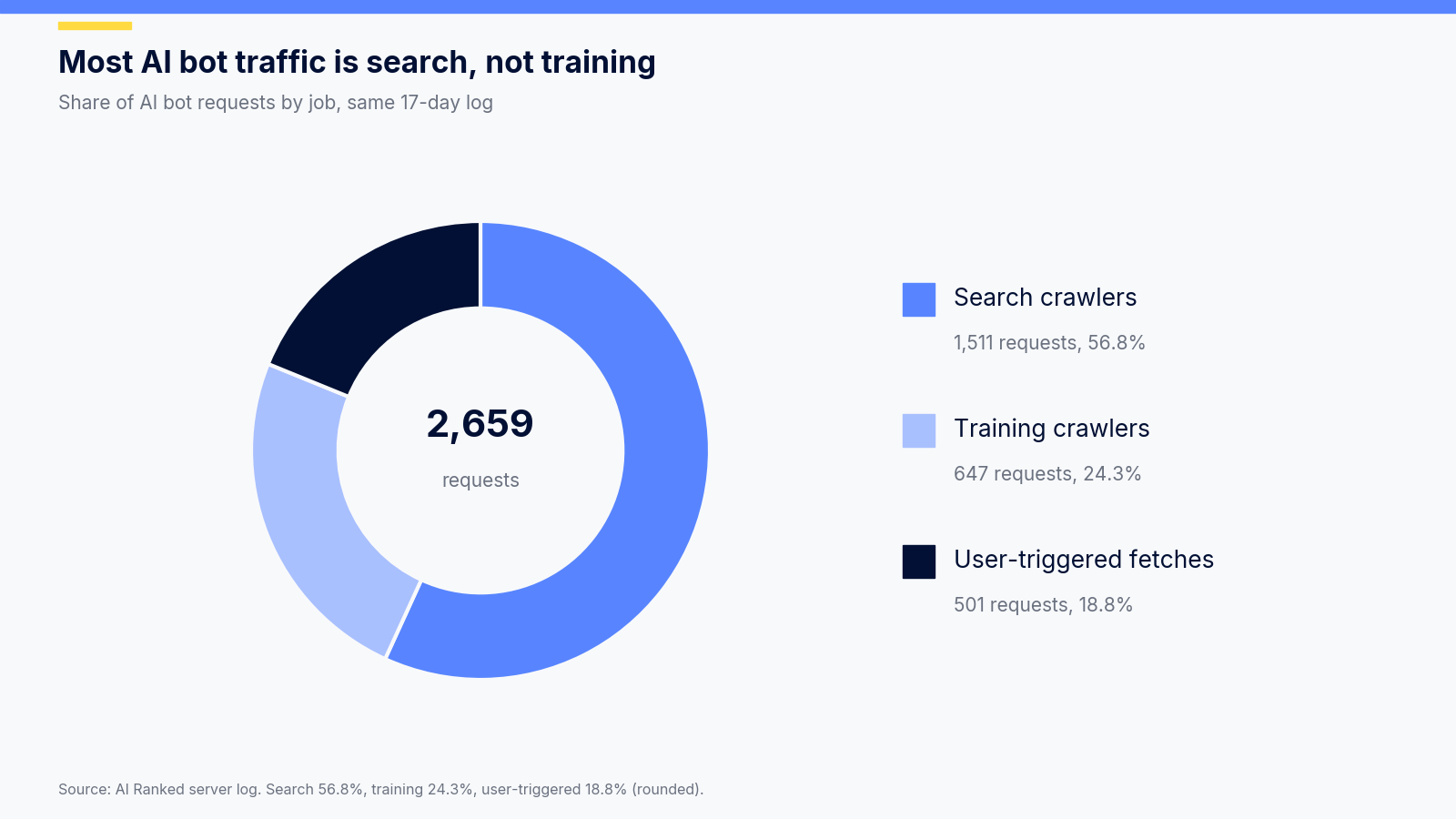
More than half of the traffic came from search crawlers, the bots that decide whether you show up in AI answers. Training crawlers, the ones most "block AI" guides focus on, made less than a quarter.
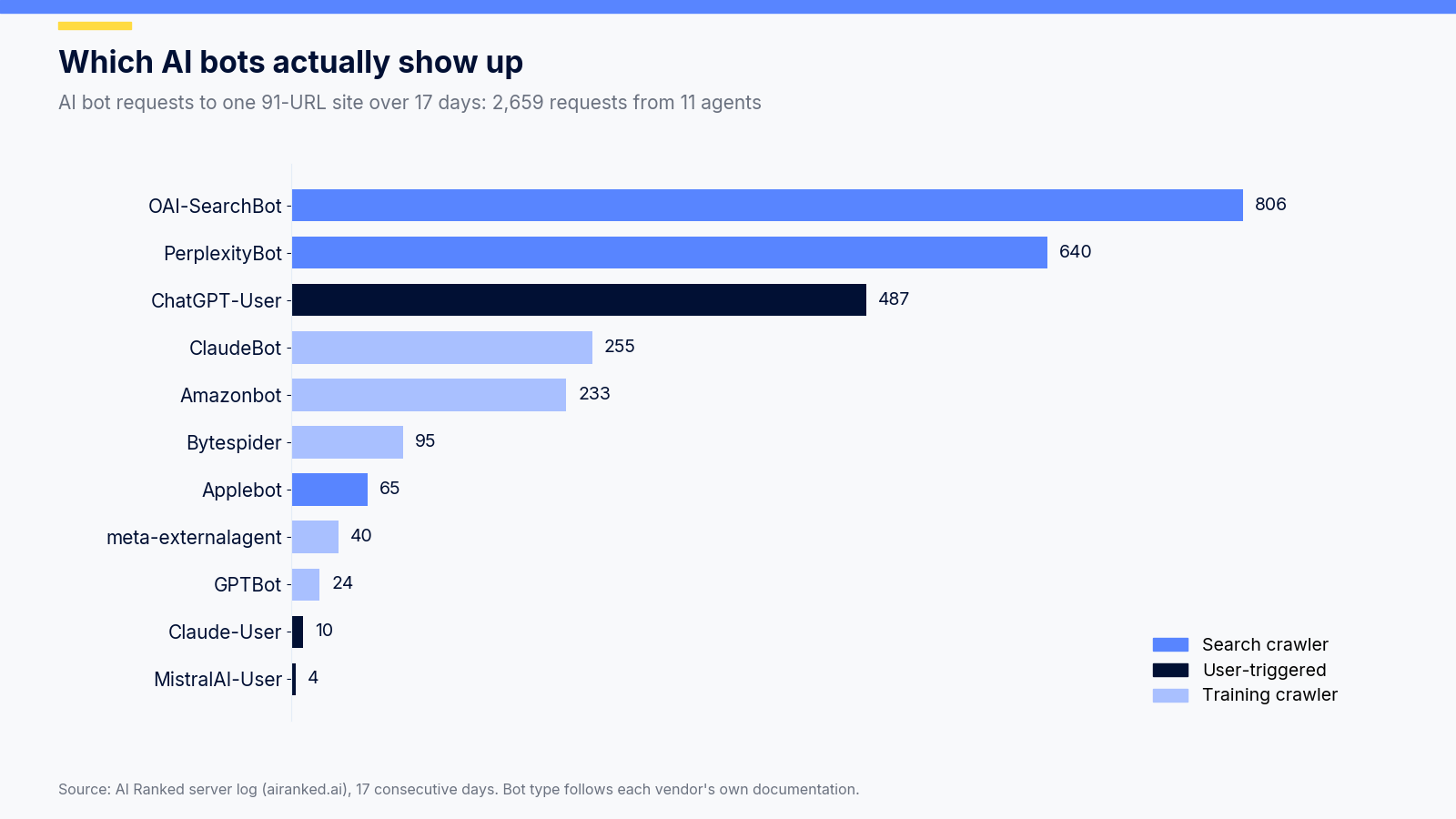
OpenAI's three agents made 1,317 of the 2,659 requests (49.5%). GPTBot, the one everyone writes rules for, made 24 of them. If your policy only mentions GPTBot, it covers less than 1% of the AI traffic on a site like ours.
Find AI crawlers in your Nginx or Apache logs
Nginx and Apache both default to the combined log format, where the user agent is the last quoted field. One grep gives you a count per bot. Put the list of agents in a variable so you can reuse it:
BOTS='GPTBot|OAI-SearchBot|ChatGPT-User|ClaudeBot|Claude-SearchBot|Claude-User|PerplexityBot|Perplexity-User|CCBot|Bytespider|Amazonbot|Applebot|meta-externalagent|MistralAI-User'

zgrep -ohE "$BOTS" /var/log/nginx/access.log* | sort | uniq -c | sort -rn
zgrep reads plain and rotated .gz files in one pass, so you get every day your logs still hold. On Apache, swap the path for /var/log/apache2/access.log* on Debian and Ubuntu, or /var/log/httpd/access_log* on RHEL-family systems.
Once you know who visits, three one-liners tell you what they do. In the combined format, field 7 is the path, field 9 the status code and field 4 the timestamp.
# Which pages OAI-SearchBot reads most
zgrep -h 'OAI-SearchBot' /var/log/nginx/access.log* | awk '{print $7}' | sort | uniq -c | sort -rn | head -20

# Status codes ClaudeBot gets back (watch for 403s and 404s)
zgrep -h 'ClaudeBot' /var/log/nginx/access.log* | awk '{print $9}' | sort | uniq -c

# PerplexityBot requests per day
zgrep -h 'PerplexityBot' /var/log/nginx/access.log* | awk '{print substr($4,2,11)}' | sort | uniq -c
The status code check is the one people skip, and it is the one that finds real problems. A wall of 403s for OAI-SearchBot usually means a firewall rule or bot protection setting is blocking a search crawler nobody meant to block.
Two things trip people up here. First, if you sit behind a CDN or load balancer, field 1 holds the proxy's IP, not the bot's. Restore the real client IP with the Nginx real_ip module (set_real_ip_from plus real_ip_header) or Apache's mod_remoteip before you try to verify anything. Second, if you already ship logs to a central stack, run the same filters there. Most of the log management and monitoring tools in a standard DevOps pipeline can save these as a dashboard in a few minutes.
Checking AI bot traffic on Cloudflare
If your site runs behind Cloudflare, your origin logs miss everything Cloudflare serves from cache or blocks at the edge. Use two views together:
- AI Crawl Control in the Cloudflare dashboard lists the AI crawlers reaching your zone and lets you allow or block each one.
- Your origin logs show what got through, with paths and status codes.
Raw edge request logs through Logpush need an Enterprise plan, so most teams combine the dashboard with origin logs. One setting to check right away: Bot Fight Mode. Perplexity's crawler documentation notes that Bot Fight Mode can't be skipped with WAF custom rules, so if it is on, an allow rule you wrote for a search crawler may never apply.
Verify that a bot is who it says it is
A user agent is just a header. Anyone can send "GPTBot". Cloudflare made this a public argument in August 2025, when it reported Perplexity traffic arriving with a generic Chrome user agent from IPs outside Perplexity's published ranges. Perplexity answered the same day that the traffic came from a third-party browser service it uses for fewer than 45,000 requests a day. Whichever side you believe, the lesson for your logs is the same: check the IP, not the name.
Reverse DNS, the classic Googlebot check, doesn't help here. When we checked, none of the addresses in OpenAI's search crawler list had a reverse DNS record, and none in Anthropic's list resolved to an Anthropic hostname. The vendors publish IP lists instead, all in the same JSON shape:
https://openai.com/gptbot.json
https://openai.com/searchbot.json
https://openai.com/chatgpt-user.json
https://www.perplexity.ai/perplexitybot.json
https://www.perplexity.ai/perplexity-user.json
https://claude.com/crawling/bots.json
Each file holds a "prefixes" array of ipv4Prefix (and sometimes ipv6Prefix) entries, so one short Python script checks any of them:
import ipaddress, json, sys, urllib.request

LISTS = {
    "GPTBot": "https://openai.com/gptbot.json",
    "OAI-SearchBot": "https://openai.com/searchbot.json",
    "ChatGPT-User": "https://openai.com/chatgpt-user.json",
    "PerplexityBot": "https://www.perplexity.ai/perplexitybot.json",
    "Perplexity-User": "https://www.perplexity.ai/perplexity-user.json",
    "ClaudeBot": "https://claude.com/crawling/bots.json",
}

def networks(url):
    req = urllib.request.Request(url, headers={"User-Agent": "ip-check/1.0"})
    data = json.load(urllib.request.urlopen(req, timeout=10))
    for p in data.get("prefixes", []):
        for key in ("ipv4Prefix", "ipv6Prefix"):
            if key in p:
                yield ipaddress.ip_network(p[key], strict=False)

def verify(bot, ip):
    addr = ipaddress.ip_address(ip)
    return any(addr in net for net in networks(LISTS[bot]))

if __name__ == "__main__":
    bot, ip = sys.argv[1], sys.argv[2]
    print(bot, ip, "verified" if verify(bot, ip) else "NOT in published ranges")
Run it as python3 verify_bot.py GPTBot 20.125.66.80. For a full log, cache the JSON files once a day instead of fetching them per line. The lists change: OpenAI's ChatGPT-User file alone held 237 prefixes when we last counted. Treat anything outside the ranges as an ordinary scraper and handle it the way you handle any other untrusted client, with the same zero-trust habits you would use to lock down an MCP server that AI agents call.
robots.txt rules that block training but keep AI search
Here is the policy most sites actually want: no training, full visibility in AI search and live answers. Copy it and adjust:
# Training crawlers: opt out
User-agent: GPTBot
User-agent: ClaudeBot
User-agent: CCBot
User-agent: Bytespider
User-agent: meta-externalagent
User-agent: Google-Extended
User-agent: Applebot-Extended
Disallow: /

# AI search and live fetches: allowed
User-agent: OAI-SearchBot
User-agent: Claude-SearchBot
User-agent: PerplexityBot
User-agent: ChatGPT-User
User-agent: Claude-User
User-agent: Perplexity-User
Disallow: /admin/
Disallow: /api/

# Everyone else
User-agent: *
Disallow: /admin/
Disallow: /api/
Three details catch developers out:
- A crawler follows only the most specific group that names it. The robots.txt standard (RFC 9309) says a bot obeys the group that matches its name and ignores the * group. If you add a GPTBot group with one line in it, GPTBot stops reading every rule under *. That is why the allowed group above repeats the /admin/ and /api/ lines.
- User-triggered agents may ignore robots.txt. OpenAI says robots.txt rules may not apply to ChatGPT-User, and Perplexity says Perplexity-User generally ignores them, because a person asked for the page. If you need those blocked, block them at the firewall with the IP lists above.
- Changes are not instant. OpenAI and Perplexity both say it can take up to about 24 hours for a robots.txt change to take effect.
How does this compare with what big sites do? We read the robots.txt of 251 high-traffic websites and counted which AI agents each one blocks from the whole site.
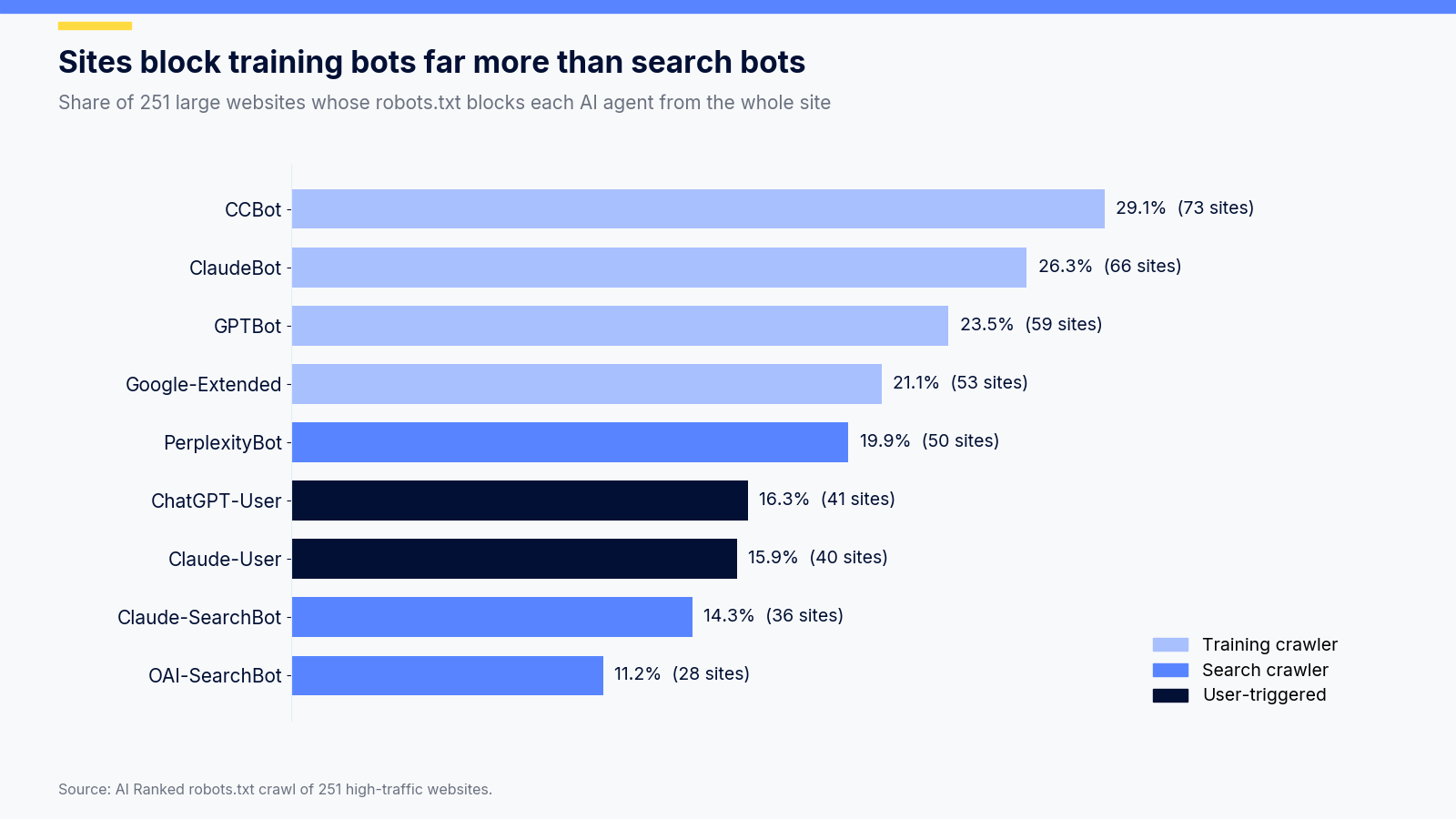
For the same vendor, sites block the training crawler about twice as often as the search crawler. 31 of the 59 sites that block GPTBot leave OAI-SearchBot open, and 30 sites block ClaudeBot while keeping Claude-SearchBot open. That split is exactly the policy above. Anthropic is the vendor people mix up most, with three current agents plus older names like anthropic-ai and Claude-Web that still sit in many files, so we wrote up how ClaudeBot crawls and how to allow or block each Anthropic agent with the exact groups to copy.
Is blocking training crawlers worth it?
Cloudflare publishes a crawl-to-referral ratio: how many pages an AI company's bots fetch for every visitor they send back. In July 2025 the gap between vendors was huge.
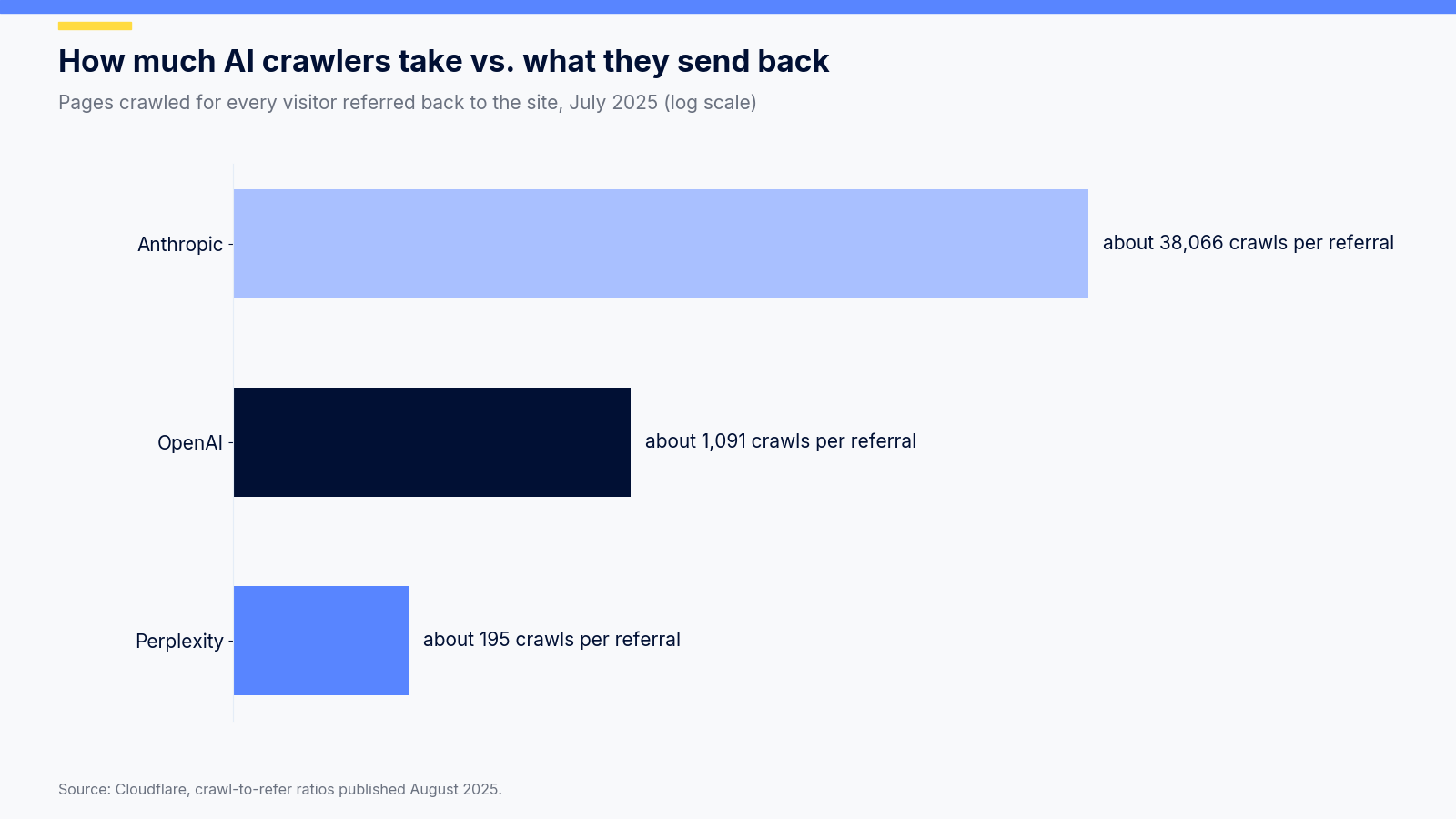
Anthropic's bots fetched about 38,066 pages for every referral, OpenAI's about 1,091 and Perplexity's about 195. Over the 12 months to July 2025, Cloudflare counted 80% of AI crawling as training, 18% as search and 2% as user actions. Training takes a lot and sends back almost nothing. Search and live fetches are where AI referral traffic comes from. That is the business case for blocking the first group and welcoming the second, and it is why we don't recommend a blanket "block all AI" rule for any site that wants traffic.
Make sure the bots you allow can read the page
Allowing a crawler is useless if it gets an empty page. Vercel's analysis of AI crawler traffic found that OpenAI's and Anthropic's crawlers fetch JavaScript files but don't execute them. A client-rendered React or Vue app can serve these bots a root div and nothing else, so the content you wanted cited never reaches them.
The quickest test is curl, because curl doesn't run JavaScript either:
# Does the raw HTML contain the sentence you want quoted?
curl -s https://example.com/pricing | grep -c "your key sentence"

# Does your stack return 200 to an AI user agent, or a 403 from a WAF rule?
curl -s -o /dev/null -w "%{http_code}\n" -A "OAI-SearchBot" https://example.com/pricing
If the first command prints 0, move that content into server-rendered HTML. Codersera covers the options in its guide to server-side rendering, metadata and dynamic rendering for React apps. For the content side, Arobis AI has a clear breakdown of what AI crawlers actually read on a page and what they skip, from headings and tables to tabs and accordions.
Where llms.txt fits
robots.txt decides who may crawl. llms.txt is a proposed Markdown file at your site root that points language models to your most useful pages. It doesn't grant or deny access, and no crawler is required to read it. Think of it as a curated sitemap for models, sitting next to the access rules in robots.txt rather than replacing them.
If you want to add one, Codersera's complete guide to the llms.txt format, with examples walks through the structure, and its roundup of llms.txt generators that actually work saves you writing it by hand.
A 15-minute AI crawler audit
Run this once now and again every month. New agents appear regularly, and assistants like xAI's Grok and its team bots keep adding new ways for AI to reach your pages.
- Count AI bot requests per agent across every log file you still have.
- Check status codes for the search and user-triggered agents. Fix any 403s or 404s you didn't intend.
- Verify the busiest bot IPs against the published lists. Treat the rest as scrapers.
- Decide your policy per job: training, search, user-triggered.
- Write a named robots.txt group per policy and repeat your shared Disallow lines inside each one.
- Block agents that ignore robots.txt at the firewall, if you need them blocked at all.
- Curl your five most important pages and confirm the key content is in the raw HTML.
Frequently asked questions
Does blocking GPTBot remove my site from ChatGPT?
No. GPTBot collects training data. ChatGPT search uses OAI-SearchBot, and live page fetches use ChatGPT-User. You can block GPTBot and still appear in ChatGPT answers, as long as OAI-SearchBot is allowed.
How often do AI crawlers visit a site?
On our 91-URL site, AI bots made an average of 161 requests a day over 16 full days, and reached every URL in the sitemap. Busier and larger sites see far more.
Can I block all AI bots with one robots.txt rule?
No. There is no standard wildcard for "AI". You have to name each agent, and the user-triggered ones may ignore robots.txt anyway, which is why the firewall and IP lists matter.
How do I know a request claiming to be ClaudeBot is real?
Check the source IP against Anthropic's published list at claude.com/crawling/bots.json. Reverse DNS won't confirm it, because those addresses don't resolve to Anthropic hostnames.
AI answers are changing how people find software, and it shows up in nearly every list of search marketing trends reshaping SEO. The sites that win are the ones that let the right bots in, keep the wrong ones out, and serve both something worth reading. Your access log already tells you which bots are which. It takes about fifteen minutes to read it.