AutoGLM-Phone-9B represents a paradigm shift in mobile automation. Unlike traditional scripts that rely on rigid XML hierarchies, this 9-billion parameter Visual Language Model (VLM) "sees" your phone screen like a human does and plans actions intelligently.
With a success rate of 36.2% on the rigorous AndroidLab benchmark (outperforming GPT-4o) and 89.7% on common tasks, it is currently the most advanced open-source solution for turning a standard Android device into an autonomous agent.
For over a decade, "smart" assistants like Siri and Google Assistant have been frustratingly limited. They can set timers or tell you the weather, but ask them to "Order my usual order from Starbucks and pay with the card ending in 1234," and they fail. They lack agency—the ability to interact with third-party app interfaces (GUIs) directly.
What is AutoGLM-Phone-9B?
AutoGLM-Phone-9B is an open-source model developed by Zhipu AI (and the Open-AutoGLM community). It is a specialized version of the GLM (General Language Model) family, fine-tuned specifically for Graphical User Interface (GUI) interaction.
Architecture & The "9B" Advantage
The "9B" refers to its 9 billion parameters. In the world of Large Language Models (LLMs), 9B is considered "mid-sized"—large enough to possess sophisticated reasoning and planning capabilities, but small enough to run on consumer-grade hardware (like a decent gaming PC) with relatively low latency.
Unlike a standard text-only model, AutoGLM is a Visual Language Model (VLM). Its architecture consists of two primary components working in a loop:
- Visual Encoder: It takes a screenshot of your phone's current state. It doesn't just look at the code behind the app; it looks at the pixels, identifying buttons, text fields, and icons just like a human eye.
- Reasoning Engine (LLM): It analyzes the visual data, understands your natural language command (e.g., "Delete all spam emails"), and plans a sequence of actions.
How It Differs from Standard LLMs
If you ask standard GPT-4 to "click the button," it can't. It has no concept of your screen's coordinate system. AutoGLM, however, has been trained on datasets of GUI interactions. It understands that a "magnifying glass" icon usually means "search" and that a "hamburger menu" contains settings. It outputs precise screen coordinates, allowing it to interact with any app, even ones it has never seen before.
3. Performance & Benchmarks
In the rapidly evolving field of AI agents, reliability is the most critical metric. How often does the agent actually complete the task without getting stuck?
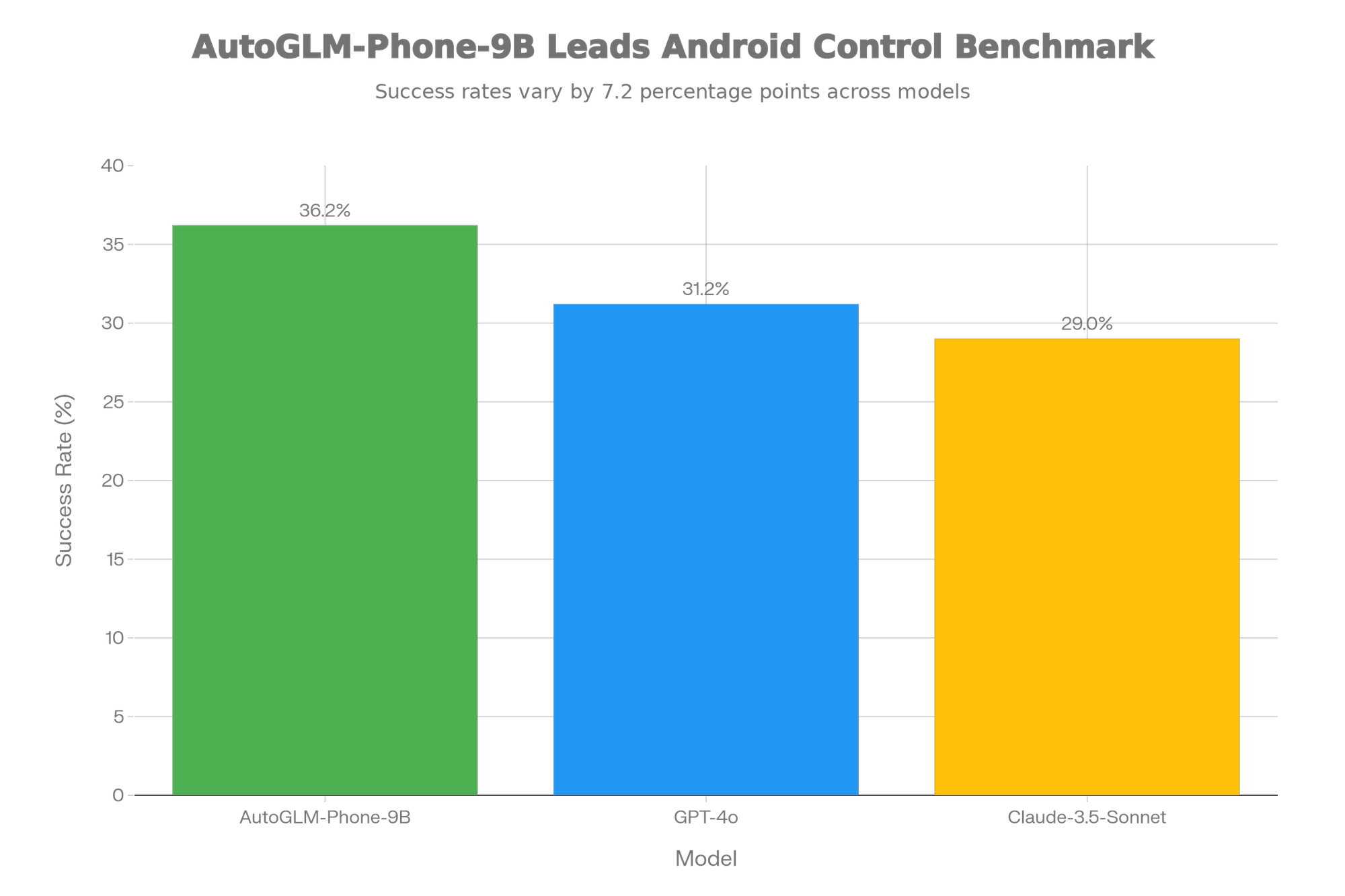
Visual Chart: AutoGLM vs. The World
We compared AutoGLM-Phone-9B against the industry-leading generalist models, GPT-4o and Claude 3.5 Sonnet, on the AndroidLab (VAB-Mobile) benchmark. This is a rigorous test suite designed to measure an agent's ability to navigate complex apps.
Key Takeaways:
- AutoGLM-Phone-9B (36.2%) outperforms GPT-4o (31.2%) and Claude-3.5-Sonnet (29.0%).
- This performance gap highlights the value of domain-specific fine-tuning. While GPT-4o is a smarter "generalist," AutoGLM is a better "specialist" for mobile interfaces.
Real-World Reliability
While the 36.2% score on difficult benchmarks might seem low, it represents complex, multi-step problem solving on unfamiliar apps. On common tasks within popular Chinese apps (like WeChat, Meituan, and Taobao) where the model has had more exposure, the success rate jumps to an impressive 89.7%. This means for daily routines—ordering food, booking rides, checking messages—it is highly reliable.
Prerequisites & Hardware Requirements
To run AutoGLM-Phone-9B, you need to distinguish between the Host (where the AI thinks) and the Client (the phone that acts).
The Host (Your PC/Server)
This is where the 9B model resides.
- OS: Linux (Ubuntu 20.04+) or Windows (via WSL2 recommended).
- GPU: NVIDIA GPU is essential for reasonable inference speed.
- Minimum: 16GB VRAM (e.g., RTX 4080, RTX 3090, or Tesla T4).
- Recommended: 24GB VRAM (RTX 3090/4090) to run the model without aggressive quantization.
- RAM: 32GB system RAM.
- Storage: At least 50GB free space for model weights and dependencies.
Note: If you lack this hardware, you can use the API mode (connecting to Zhipu's cloud), but this article focuses on the open-source, local execution method.
The Client (Your Android Phone)
- OS: Android 10 or higher.
- Settings: Developer Mode enabled, USB Debugging enabled.
- Connection: High-quality USB data cable (Wi-Fi debugging is possible but less stable for high-frequency screenshot transmission).
Installation Guide: From Zero to Agent
Follow these steps to deploy AutoGLM. We assume you are using a Linux/WSL environment with Python installed.
Step 1: Environment Setup
First, ensure you have Anaconda or Miniconda installed to manage dependencies.
# Create a fresh environment for AutoGLM
conda create -n autoglm python=3.10
conda activate autoglm

# Install PyTorch (ensure CUDA version matches your driver)
pip install torch torchvision torchaudio --index-url https://download.pytorch.org/whl/cu118
Step 2: Install ADB (Android Debug Bridge)
Your computer needs to talk to your phone.
- Ubuntu/Debian:
sudo apt-get install android-tools-adb - Windows: Download SDK Platform Tools, unzip, and add to PATH.
Verify connection:
bashadb devices# Output should show: "List of devices attached"
# ZR222... device
Step 3: Clone the Repository
Download the AutoGLM code from the official Zhipu AI / Open-AutoGLM repository.
git clone https://github.com/zai-org/Open-AutoGLM.git
cd Open-AutoGLM

# Install required python packages
pip install -r requirements.txt
pip install -e .
Running the Agent: Step-by-Step
Once installed, running the agent is straightforward. You will use a Python script to initiate the "Loop": Snapshot -> Inference -> Action.
Basic CLI Command
This command tells the agent to use the 9B model to perform a specific task.
python main.py \
  --device-id YOUR_DEVICE_SERIAL_HERE \
  --model "autoglm-phone-9b" \
  --prompt "Open YouTube and search for 'SEO optimization tips for 2025' and play the first video"
Interactive Mode
For continuous usage, you can run an interactive session where the agent stays alive, waiting for new commands.
bashpython main.py --interactive --device-id YOUR_DEVICE_SERIAL
What happens next?
- Observation: The script takes a screenshot via ADB (
adb shell screencap). - Analysis: The 9B model analyzes the image, locating the "YouTube" icon.
- Action: It generates an ADB command (
adb shell input tap x y) to open the app. - Loop: It takes another screenshot to verify the app opened, then looks for the search bar, types the text, and selects the video.
In-Depth Comparison: AutoGLM vs. Competitors
How does AutoGLM stack up against other "Action Agents"?
Comparison Table
| Feature | AutoGLM-Phone-9B | AppAgent (Tencent) | Ferret-UI (Apple) | GPT-4o (OpenAI) |
|---|---|---|---|---|
| Primary Method | Visual Language Model (VLM) | VLM + XML Exploration | Multimodal Understanding | Generalist VLM |
| Android Success Rate | 36.2% (Highest) | ~25-30% | N/A (UI Focus only) | 31.2% |
| Open Source? | Yes (Code & Weights) | Yes | Yes (Weights only) | No (API only) |
| Interaction Speed | Moderate (Local Inference) | Slow (Exploration Phase) | Fast (Efficiency focus) | Variable (Network Latency) |
| Deployment | Local GPU or API | Local GPU | Research / Local | Cloud API |
| Best For... | End-to-end Automation | App Testing & Exploration | Screen Understanding | Chat & General Queries |
Competitor Analysis
- AppAgent: A pioneer in the field, AppAgent works by "exploring" an app first to learn its layout. AutoGLM is superior because it generally requires less "training" on a specific app; its generalization is stronger out of the box.
- Ferret-UI: Apple's model is incredible at understanding what is on a screen (e.g., "describe this icon"), but it is less mature as an agent that executes actions via ADB. AutoGLM is a complete "Action" package.
- GPT-4o: While powerful, GPT-4o often hallucinates coordinates. It might say "click the button at (500, 500)" when the button is actually at (500, 600). AutoGLM's specific training on GUI datasets gives it tighter spatial precision.
Unique Selling Proposition (USP)
Why choose AutoGLM-Phone-9B?
- Coordinate Precision: Its ability to map visual elements to exact
(x, y)pixel coordinates is superior to generalist models, significantly reducing "missed clicks." - Chinese App Mastery: If your workflow involves WeChat, Alipay, or other "Super Apps" with complex, cluttered interfaces, AutoGLM is the undisputed king, having been trained heavily on these UI patterns.
- Privacy: Because it can be run locally (if you have the GPU), your personal data (screenshots of your messages, bank apps) never leaves your premises. This is a massive advantage over cloud-based agents like GPT-4o.
Pricing & Availability
- Software Cost: Free. The code is open-source (Apache 2.0 license typically applies to the framework, check model license on Hugging Face).
- Operational Cost:
- Local Run: Cost of electricity + Hardware (RTX 3090/4090 ~ $1500+).
- API Mode: If Zhipu AI offers an API endpoint for this model, it typically follows a token-based pricing model (e.g., ~$0.50 - $2.00 per million tokens), which is significantly cheaper than buying hardware for casual use.
Troubleshooting & Best Practices
Common Issue 1: "ADB Device Offline"
- Fix: Revoke USB debugging authorizations on your phone settings and reconnect. Ensure the cable is data-capable.
Common Issue 2: Agent Clicks Wrong Location
- Fix: Check your phone's resolution. The model might expect a standard 1080x1920 input. If your phone is 1440p, the script usually handles scaling, but verify the
--resolutionflag in the configuration matches your device.
Common Issue 3: Hallucinations (Stuck in a Loop)
- Fix: If the agent keeps clicking "Back" or getting stuck, the prompt might be too vague. Break complex tasks into sub-steps: Instead of "Book a flight," try "Open Expedia," then "Search for flights to NY," then "Select the first option."
Best Practice: The "Human-in-the-Loop"
For sensitive tasks (money transfer, deleting data), always run in "Interactive Mode" where the agent asks for confirmation before the final "Commit" tap.
Future Outlook: The Road to On-Device NPU
Currently, AutoGLM-Phone-9B relies on a PC to do the heavy lifting. However, 2025/2026 flagship phones (Snapdragon 8 Gen 5, Dimensity 9500) are incorporating powerful NPUs (Neural Processing Units) capable of running 7B-10B models directly on the device.
We expect a "AutoGLM-Mobile-Quantized" version soon, which will allow this agent to run entirely on your phone without a PC connection, draining battery but offering true, portable autonomy.
FAQs
1. What is AutoGLM-Phone-9B used for?
AutoGLM-Phone-9B is an AI agent that visually understands your Android phone’s screen and performs actions like tapping, typing, searching, navigating apps, and completing multi-step tasks automatically.
2. What hardware do I need to run AutoGLM locally?
You need a PC with an NVIDIA GPU (16–24GB VRAM recommended), 32GB RAM, and around 50GB storage. Your Android phone must have USB debugging enabled.
3. Is AutoGLM-Phone-9B better than GPT-4o for mobile automation?
Yes. It achieves a 36.2% success rate on AndroidLab—higher than GPT-4o and Claude—because it is fine-tuned specifically for mobile UI interaction.
4. Can AutoGLM run entirely on a smartphone?
Not yet. Today it requires a PC host, but future quantized versions may run directly on-device as NPUs grow more powerful.
5. Is AutoGLM free to use?
Yes. The software and model weights are open-source. You only pay for your hardware or optional API usage.
Conclusion
AutoGLM-Phone-9B is not just a tech demo; it is a glimpse into the future of computing. By moving beyond text generation to actual action execution, it transforms the smartphone from a tool that demands your attention into an agent that saves it. Whether you are an SEO expert automating keyword research on mobile apps or a developer testing UI flows, AutoGLM offers the most advanced, open, and reliable toolkit available today.